


How to Use cTrader for Prop Firm Challenges and Funded Goals
Many traders today use cTrader to take on prop firm challenges and reach funded goals. The platform is known for speed, precision, and transparency - three things that matter most when every trade counts. If you’re preparing for a challenge or managing a funded account, this guide will show you how to get the most out of cTrader.
What Makes cTrader Ideal for Prop Traders
Prop firm challenges test consistency, risk control, and discipline. You must reach a profit target without breaking drawdown rules. cTrader helps with this because it gives traders full control and real-time insight into every trade.
It was built by Spotware Systems to give traders a fair trading environment. Unlike some platforms, it clearly shows execution speed, trade history, and commission details. Nothing is hidden. This transparency helps you make better decisions and review your trades with confidence.
The interface is clean and logical. You can open, modify, and close trades in seconds. Every chart is interactive, and you can trade directly from it. For prop challenges that demand precision, this is a big advantage.
Setting Up cTrader for Prop Firm Use
1. Choose the Right Version
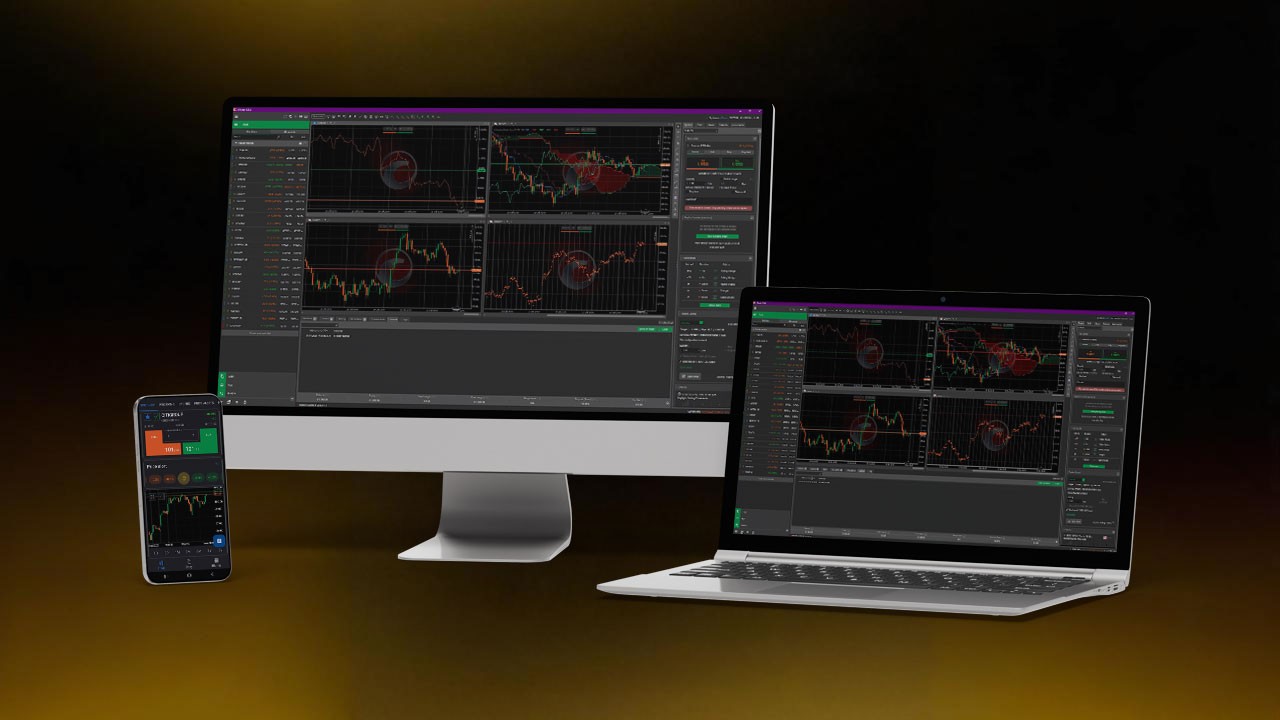
You can trade on cTrader Desktop, Web, or Mobile. Most prop firms accept all three. Use Desktop for full charting tools and algorithmic testing. Use Web or Mobile to monitor and manage trades on the go. To learn more about how to setup ctrader app on mobile we suggest reading this article.
2. Connect Your Prop Firm Account
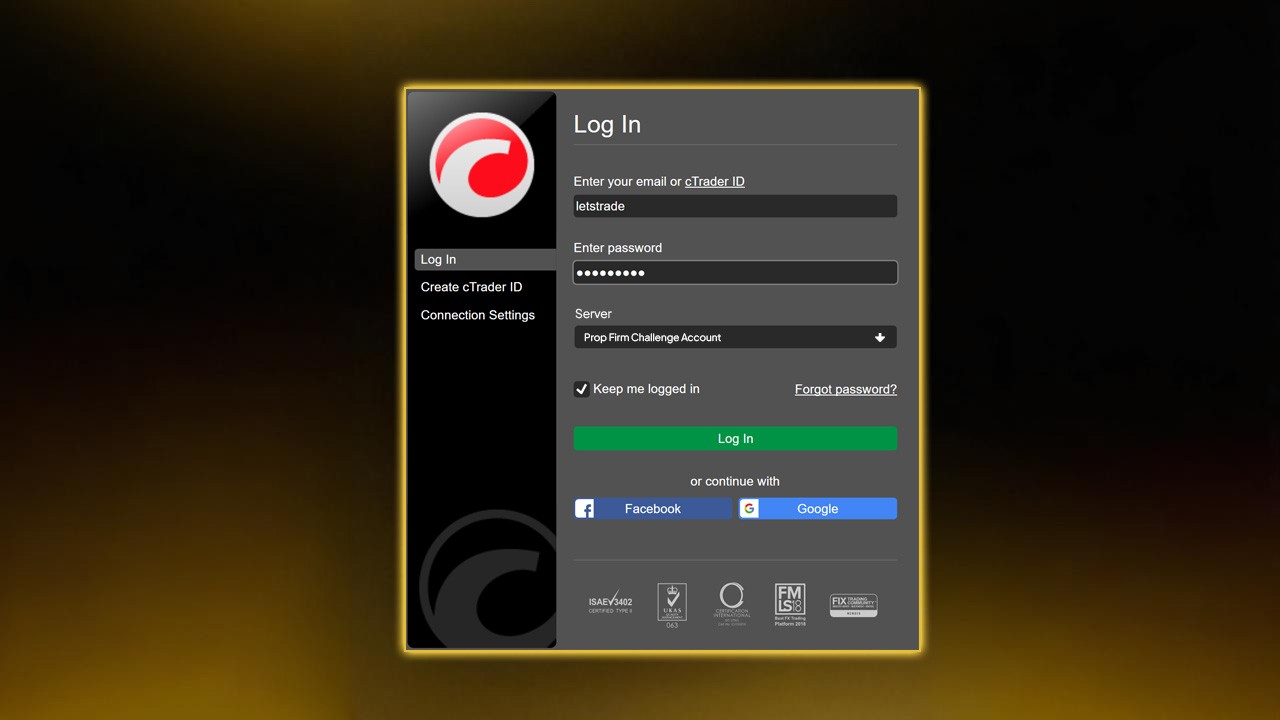
Once you buy or receive your challenge credentials, log in through the firm’s server on cTrader. Select the firm’s name from the broker list, enter your login and password, and confirm the account type - demo or live challenge.
Always double-check that you are on the correct server. Using the wrong one may show false balances or block trading. You can learn more about creating an efficient layout by reading The Only Trading Plan You Need for a Funded Account Challenge.
3. Customize Your Workspace
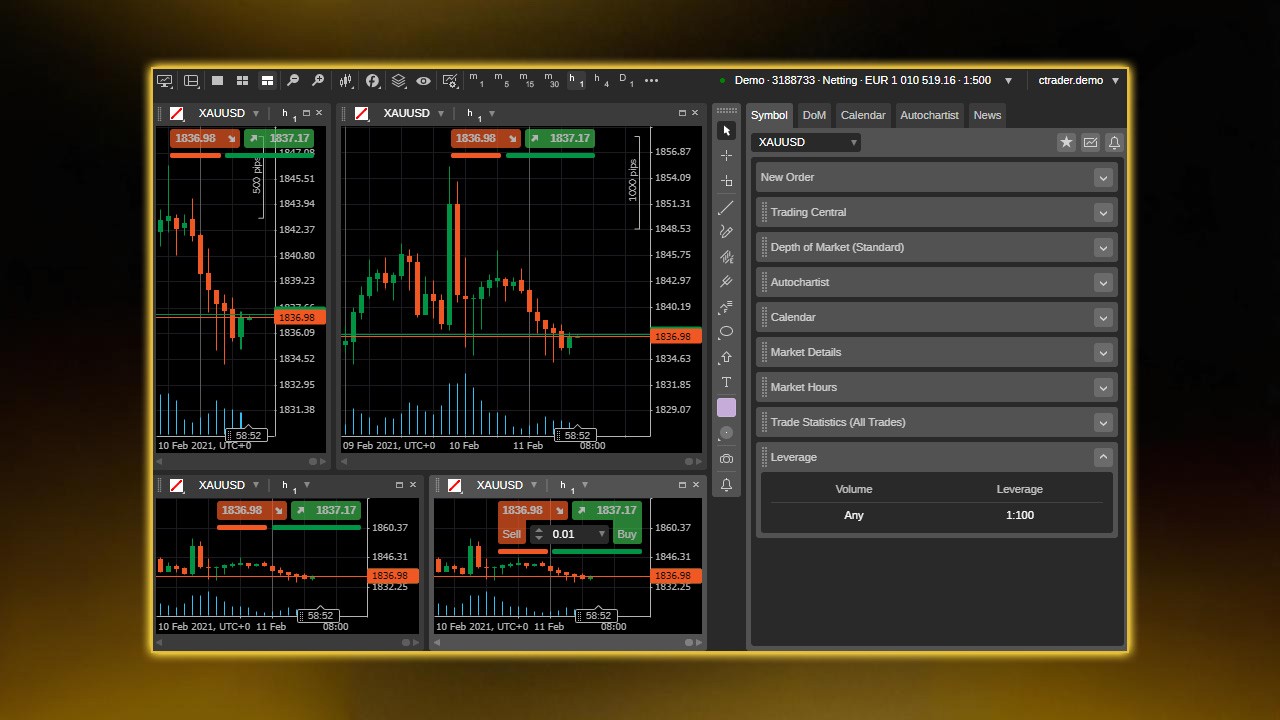
Arrange the charts, watchlists, and trading panels in a way that fits your style. For prop trading, keep a clear layout - one watchlist for your main pairs and one for secondary setups. Avoid clutter. Fast access is key when you need to react quickly.
Save your layout so you can reload it anytime. Consistency builds focus, and focus is what wins challenges.
How to Place and Manage Trades on cTrader
Quick Trade Panel
At the top of every chart, you’ll see the Quick Trade buttons. You can set your lot size and click Buy or Sell instantly. Execution is near-instant, which helps when volatility spikes.
New Order Window
For more control, open the New Order window. Here you can set entry price, stop loss, take profit, and order type - Market, Limit, Stop, or Stop Limit. This is where discipline starts. Always define your risk before placing any order.
Risk Per Trade
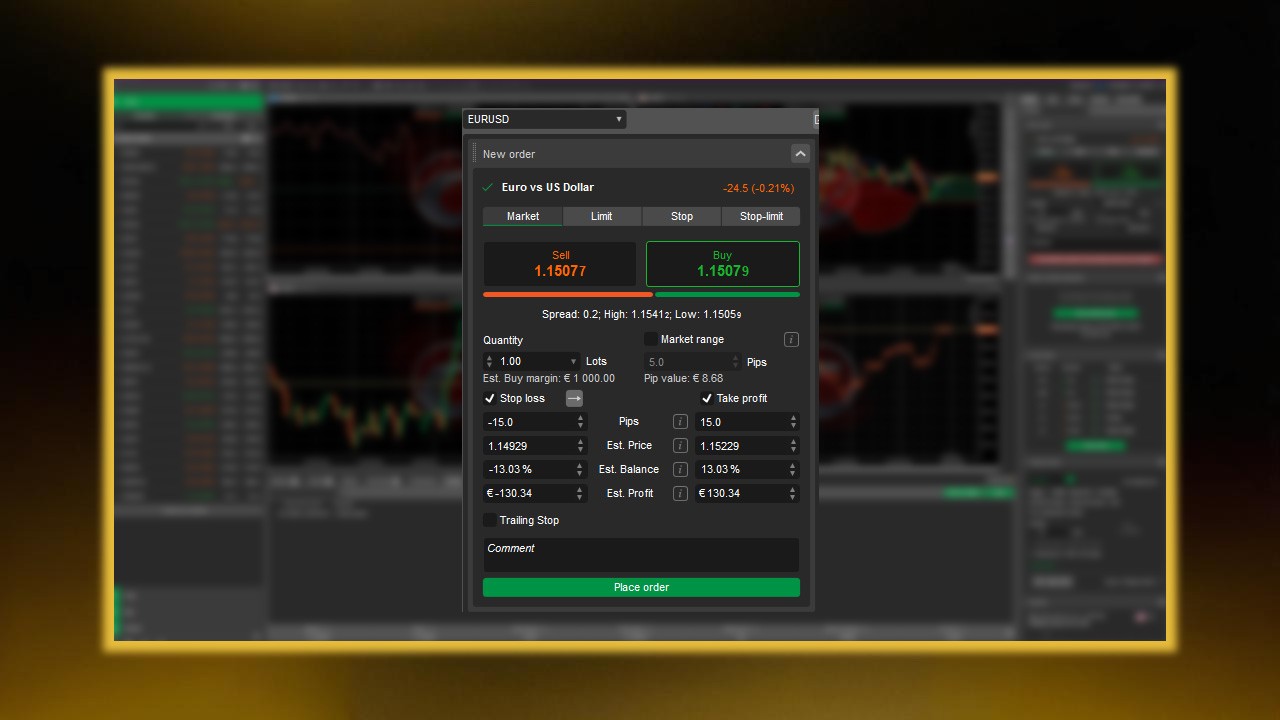
Prop firm rules often limit daily and overall drawdown. Keep risk per trade between 0.5% to 1% of account equity. For example, if your account is $100,000, each trade should risk no more than $1,000. cTrader’s built-in position calculator shows this instantly. Use it before every trade.
For a deeper understanding of lot sizing and exposure, check Margin vs Leverage for prop traders.
Stop Loss and Take Profit
Set your stop and target as soon as you open a position. Never move your stop farther away to “give the trade room.” That habit kills funded accounts. You can drag stop lines directly on the chart to adjust levels visually. Read this article about how to use stop loss and take profit.
Close and Partial Close
You can close trades from the Positions tab or right on the chart. Partial closing lets you lock profits while keeping part of the position open. This feature helps with scaling out in profit — a smart tactic for prop firm consistency rules.
Using cTrader for Risk and Drawdown Control
Prop firm success is mostly about risk management. cTrader makes this part easy if you use its tools properly.
Equity and Margin View
At the bottom of the platform, you’ll see Equity, Free Margin, and Margin Level. Margin Level shows how close you are to hitting a margin call. A level below 100% means trouble. Keep it above 500% for safe operation during challenges.
Daily Drawdown Awareness
Some prop firms enforce a daily loss limit — say, 5% per day. Track your floating P/L and closed trades carefully. cTrader updates them in real time. If you’re down near that limit, stop trading for the day. Protect your progress.
For risk-control insights, read the article about Risk Management in Forex Prop Trading.
Risk-to-Reward Monitoring
Each trade should aim for at least a 1:2 risk-reward ratio. If you risk $100, aim for $200 profit. The TradeWatch section displays open positions and potential profit/loss, helping you evaluate this ratio live.
Session Management
Prop firm traders often make mistakes by trading every session. Use cTrader’s Market Hours indicator to track when markets open or close. Focus on high-volume sessions like London or New York where spreads are tighter.

Advanced Tools for Prop Challenges
cTrader Automate (formerly cAlgo)
This feature allows you to test and deploy automated trading bots (cBots) using C#. You can backtest strategies against historical data to see how they perform. Automation is useful for traders who want consistent, rule-based execution.
Before using bots on a challenge, check if your prop firm allows automated trading. Some do, some don’t. Never risk disqualification - especially when choosing between the best cTrader prop firms.
Custom Indicators
cTrader supports custom indicators coded in C#. You can build your own or download from the cTrader community. Examples include support/resistance zones, supply-demand tools, or volatility meters. These help refine entries without cluttering charts. For a deeper breakdown, see our other guide on cTrader indicators.
Copy Trading
Some prop traders follow experienced managers through cTrader Copy. While convenient, be careful — most prop firms require all trades to be your own. Use copy features only for learning, not for passing evaluations.
Trade Analytics
Use Trade Statistics and History to review performance. These sections show win rate, average risk-reward, maximum drawdown, and profit factor. Track your data weekly. The goal is to stay consistent - not to hit one lucky streak.
Strategy Tips for Passing Prop Firm Challenges
1. Know the Rules by Heart
Each prop firm is different. Some have static drawdown limits; others use trailing drawdowns. Some require consistency, meaning no single trade can make up more than 30% of total profits. Learn every rule before trading day one.
If you break a rule even while profitable, you will fail. Knowing the rules saves your challenge. For a complete breakdown on challenge structures, check tips to pass a forex prop firm challenge.
2. Keep It Simple
Stick to one or two currency pairs. Master their behavior. EUR/USD or XAU/USD are great for beginners due to high liquidity and low spreads. Avoid chasing every market. Too many pairs cause analysis overload and mistakes.
3. Trade During High Liquidity
Trade only during active sessions. Liquidity means tighter spreads and faster fills. Avoid low-volume hours like after the New York close. Spikes and slippage are more common then.
4. Limit the Number of Trades
OPO Finance recommends no more than five trades per day. More trades mean more exposure and more emotional fatigue. Plan your setups ahead of time. Wait for your signal. Quality beats quantity.
5. Risk Small and Stay Consistent
RebelsFunding stresses small, consistent profits over big wins. A 1% daily gain compounds fast. The trader who stays calm and steady will pass long before the one chasing 10% days.
6. Review and Adjust
Use cTrader’s history tab at the end of each week. Filter losing trades by reason. Did you enter early? Did you ignore your stop? This feedback loop is what turns challenge traders into funded traders.
For emotional discipline tips, read our guide on Psychology of Trading.
Example Setup: Trading a Prop Challenge on cTrader
Let’s take a simple example.
You’re in a $50,000 challenge with a 10% profit target and 5% max daily loss. Your goal is $5,000 profit without losing $2,500 in a single day.
You decide to risk 1% per trade ($500). That gives you five full-loss trades before hitting the daily limit.
Your average setup has a 1:2 risk-reward ratio. Each win makes $1,000. So, five clean wins in a month could pass the challenge, even with a few losses mixed in.
Using cTrader:
Open EUR/USD chart on the 1-hour timeframe.
Draw key support and resistance zones using the rectangle tool.
Wait for price to test a zone with confirmation from RSI divergence.
Open a trade using the New Order window.
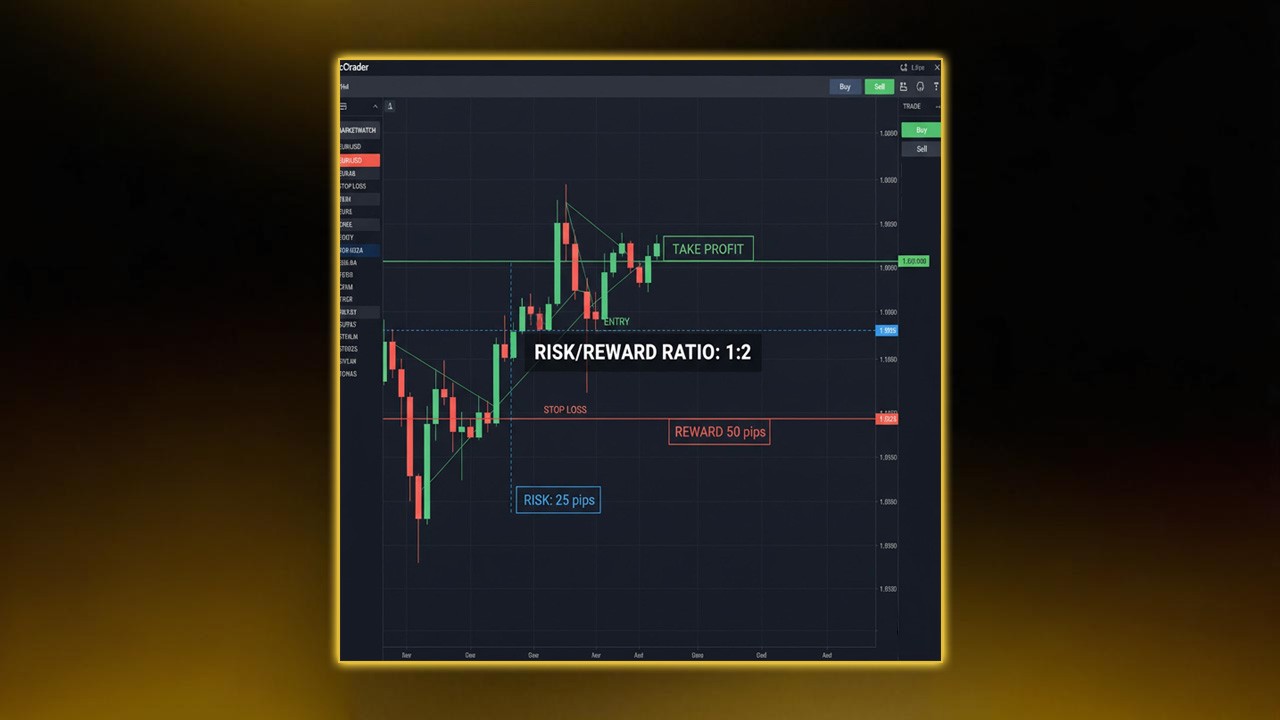
Risk $500 by setting your stop 25 pips away if trading two lots.
Set take profit 50 pips away for a 1:2 ratio.
Drag your stop to break even once price moves halfway.
Record the result in your trading journal.
Repeat this process. Don’t skip steps. The goal is not to win every trade — it’s to survive long enough for math to work in your favor. You can find more practical examples in Top 10 Forex Trading Tips for beginners.
How to Transition from Challenge to Funded Account
Passing the challenge is only the start. Once funded, the same discipline must continue.
Avoid Overconfidence
Many traders double their risk once funded. That’s how they lose funding. Keep the same strategy, same risk, same process.
Stick to Weekly Goals
If your profit split pays monthly, aim for steady weekly growth. For example, target 2% per week. Slow, consistent profits keep your account safe.
Withdraw Smart
Some firms allow bi-weekly payouts. Don’t rush to withdraw everything. Leave capital to cushion drawdowns. Fund longevity beats one-time payouts.
Keep Records
Funded accounts often get monitored. Detailed records prove you’re trading responsibly. Save your cTrader statements and screenshots as proof of discipline.
Common Mistakes to Avoid
Ignoring Rules
Most challenge failures come from breaking rules, not losing money. Always check your dashboard each morning.
Moving Stops
This single mistake ruins more traders than anything else. Accept small losses; they protect your future.
Over-trading
Trading too often increases errors and emotional swings. Fewer, stronger setups make better results.
Trading News Without a Plan
Major news events move markets fast. If your system isn’t built for volatility, stay flat. Avoid gambling before NFP or CPI releases.
Ignoring Mental Health
Trading under pressure is tiring. Sleep well, take breaks, and exercise. A clear mind trades better than a tired one.
Why cTrader Beats Other Platforms for Prop Challenges
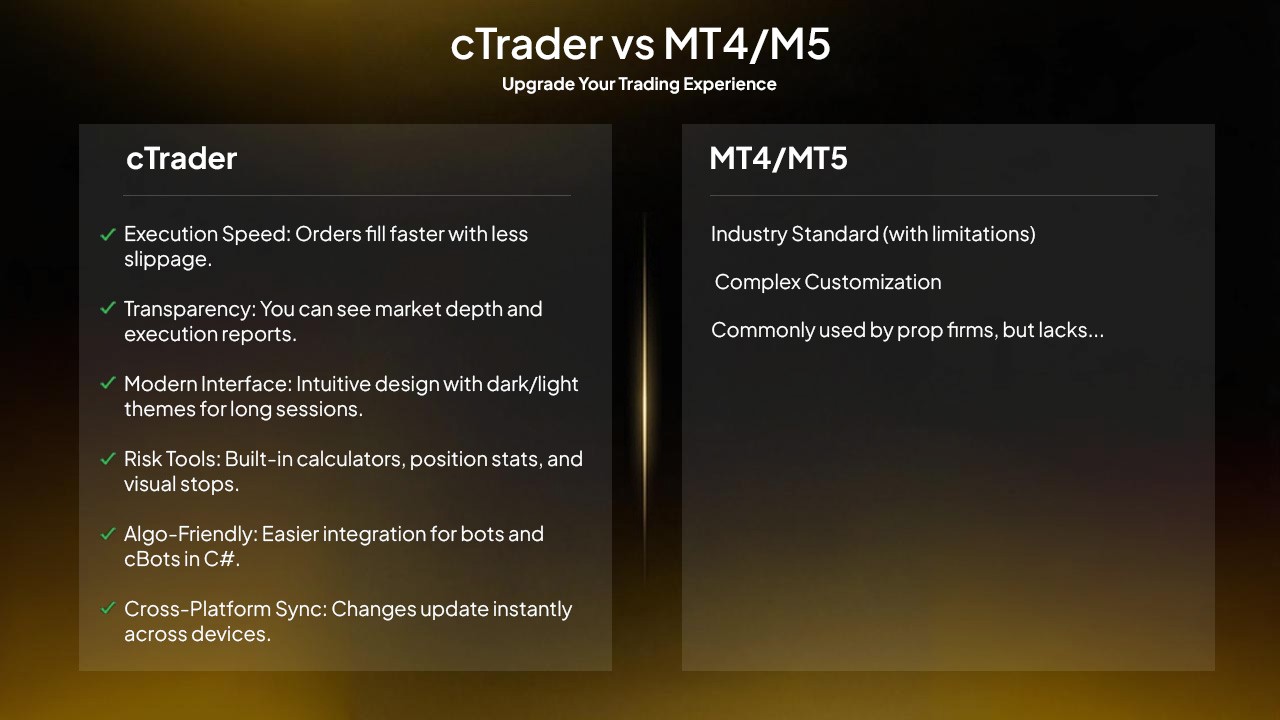
Many prop firms use MetaTrader 4 or 5, but cTrader offers unique advantages:
Execution Speed: Orders fill faster with less slippage.
Transparency: You can see market depth and execution reports.
Modern Interface: Intuitive design with dark/light themes for long sessions.
Risk Tools: Built-in calculators, position stats, and visual stops.
Algo-Friendly: Easier integration for bots and cBots in C#.
Cross-Platform Sync: Changes update instantly across devices.
These features help traders stay organized and meet firm rules more efficiently.
Building Confidence with the cTrader Simulator
Before your real challenge, test your strategy using the cTrader Simulator. It lets you replay past market data as if trading live. You can practice entries, stops, and targets at real speed.
Simulated trading helps spot weaknesses in your plan without risking capital. Run several months of practice data. Track your profit factor, drawdown, and win rate. Enter the challenge only when your results show consistency.
Final Thoughts
Prop firm challenges are designed to test more than skill. They test patience, consistency, and risk control. cTrader gives you the right tools to handle all three.
Use the platform’s transparency, automation, and analytics to build discipline. Stick to your plan, manage risk, and track results every week. The goal isn’t just to pass a challenge — it’s to become the kind of trader who can keep a funded account alive and growing.
Prop firms like Pipstone Capital make cTrader part of their funded trading programs, offering traders fast execution, low spreads, and transparent pricing — all key advantages for meeting challenge targets. Our structure rewards consistent, risk-smart performance, which fits perfectly with cTrader’s focus on discipline and data-driven trading.
If you treat cTrader as your trading partner, not just a platform, it can be the difference between another failed attempt and your first funded success.
FAQ: cTrader for Firm Challenges
What is cTrader?
cTrader is a professional trading platform used for forex and CFD trading. It’s known for speed, advanced charts, and transparency.
Why do prop firms use cTrader?
It offers low latency, detailed analytics, and strict risk control tools — perfect for passing trading challenges and maintaining funded accounts.
Can I use bots or automation on cTrader during a prop firm challenge?
Some firms allow automation through cBots, while others don’t. Always confirm your firm’s policy before using any automated tool.
How much should I risk per trade in a prop challenge?
Stay between 0.5% and 1% risk per trade to stay safe under drawdown limits.
What’s the advantage of cTrader over MT4/MT5?
Faster execution, full market depth visibility, and a cleaner interface. It also supports algorithmic trading in C# for precision strategies. Check this article for a better breakdown the differences between ctrader vs mt5.
Does cTrader have a simulator for practice?
Yes. The cTrader Simulator allows traders to backtest and practice strategies on real market data.
How do I stay consistent in a prop firm challenge?
Follow one plan, track your metrics weekly, and avoid emotional trades. Consistency, not luck, earns funded accounts.



How to Use cTrader for Prop Firm Challenges and Funded Goals
Many traders today use cTrader to take on prop firm challenges and reach funded goals. The platform is known for speed, precision, and transparency - three things that matter most when every trade counts. If you’re preparing for a challenge or managing a funded account, this guide will show you how to get the most out of cTrader.
What Makes cTrader Ideal for Prop Traders
Prop firm challenges test consistency, risk control, and discipline. You must reach a profit target without breaking drawdown rules. cTrader helps with this because it gives traders full control and real-time insight into every trade.
It was built by Spotware Systems to give traders a fair trading environment. Unlike some platforms, it clearly shows execution speed, trade history, and commission details. Nothing is hidden. This transparency helps you make better decisions and review your trades with confidence.
The interface is clean and logical. You can open, modify, and close trades in seconds. Every chart is interactive, and you can trade directly from it. For prop challenges that demand precision, this is a big advantage.
Setting Up cTrader for Prop Firm Use
1. Choose the Right Version
You can trade on cTrader Desktop, Web, or Mobile. Most prop firms accept all three. Use Desktop for full charting tools and algorithmic testing. Use Web or Mobile to monitor and manage trades on the go. To learn more about how to setup ctrader app on mobile we suggest reading this article.
2. Connect Your Prop Firm Account
Once you buy or receive your challenge credentials, log in through the firm’s server on cTrader. Select the firm’s name from the broker list, enter your login and password, and confirm the account type - demo or live challenge.
Always double-check that you are on the correct server. Using the wrong one may show false balances or block trading. You can learn more about creating an efficient layout by reading The Only Trading Plan You Need for a Funded Account Challenge.
3. Customize Your Workspace
Arrange the charts, watchlists, and trading panels in a way that fits your style. For prop trading, keep a clear layout - one watchlist for your main pairs and one for secondary setups. Avoid clutter. Fast access is key when you need to react quickly.
Save your layout so you can reload it anytime. Consistency builds focus, and focus is what wins challenges.
How to Place and Manage Trades on cTrader
Quick Trade Panel
At the top of every chart, you’ll see the Quick Trade buttons. You can set your lot size and click Buy or Sell instantly. Execution is near-instant, which helps when volatility spikes.
New Order Window
For more control, open the New Order window. Here you can set entry price, stop loss, take profit, and order type - Market, Limit, Stop, or Stop Limit. This is where discipline starts. Always define your risk before placing any order.
Risk Per Trade
Prop firm rules often limit daily and overall drawdown. Keep risk per trade between 0.5% to 1% of account equity. For example, if your account is $100,000, each trade should risk no more than $1,000. cTrader’s built-in position calculator shows this instantly. Use it before every trade.
For a deeper understanding of lot sizing and exposure, check Margin vs Leverage for prop traders.
Stop Loss and Take Profit
Set your stop and target as soon as you open a position. Never move your stop farther away to “give the trade room.” That habit kills funded accounts. You can drag stop lines directly on the chart to adjust levels visually. Read this article about how to use stop loss and take profit.
Close and Partial Close
You can close trades from the Positions tab or right on the chart. Partial closing lets you lock profits while keeping part of the position open. This feature helps with scaling out in profit — a smart tactic for prop firm consistency rules.
Using cTrader for Risk and Drawdown Control
Prop firm success is mostly about risk management. cTrader makes this part easy if you use its tools properly.
Equity and Margin View
At the bottom of the platform, you’ll see Equity, Free Margin, and Margin Level. Margin Level shows how close you are to hitting a margin call. A level below 100% means trouble. Keep it above 500% for safe operation during challenges.
Daily Drawdown Awareness
Some prop firms enforce a daily loss limit — say, 5% per day. Track your floating P/L and closed trades carefully. cTrader updates them in real time. If you’re down near that limit, stop trading for the day. Protect your progress.
For risk-control insights, read the article about Risk Management in Forex Prop Trading.
Risk-to-Reward Monitoring
Each trade should aim for at least a 1:2 risk-reward ratio. If you risk $100, aim for $200 profit. The TradeWatch section displays open positions and potential profit/loss, helping you evaluate this ratio live.
Session Management
Prop firm traders often make mistakes by trading every session. Use cTrader’s Market Hours indicator to track when markets open or close. Focus on high-volume sessions like London or New York where spreads are tighter.
Advanced Tools for Prop Challenges
cTrader Automate (formerly cAlgo)
This feature allows you to test and deploy automated trading bots (cBots) using C#. You can backtest strategies against historical data to see how they perform. Automation is useful for traders who want consistent, rule-based execution.
Before using bots on a challenge, check if your prop firm allows automated trading. Some do, some don’t. Never risk disqualification - especially when choosing between the best cTrader prop firms.
Custom Indicators
cTrader supports custom indicators coded in C#. You can build your own or download from the cTrader community. Examples include support/resistance zones, supply-demand tools, or volatility meters. These help refine entries without cluttering charts. For a deeper breakdown, see our other guide on cTrader indicators.
Copy Trading
Some prop traders follow experienced managers through cTrader Copy. While convenient, be careful — most prop firms require all trades to be your own. Use copy features only for learning, not for passing evaluations.
Trade Analytics
Use Trade Statistics and History to review performance. These sections show win rate, average risk-reward, maximum drawdown, and profit factor. Track your data weekly. The goal is to stay consistent - not to hit one lucky streak.
Strategy Tips for Passing Prop Firm Challenges
1. Know the Rules by Heart
Each prop firm is different. Some have static drawdown limits; others use trailing drawdowns. Some require consistency, meaning no single trade can make up more than 30% of total profits. Learn every rule before trading day one.
If you break a rule even while profitable, you will fail. Knowing the rules saves your challenge. For a complete breakdown on challenge structures, check tips to pass a forex prop firm challenge.
2. Keep It Simple
Stick to one or two currency pairs. Master their behavior. EUR/USD or XAU/USD are great for beginners due to high liquidity and low spreads. Avoid chasing every market. Too many pairs cause analysis overload and mistakes.
3. Trade During High Liquidity
Trade only during active sessions. Liquidity means tighter spreads and faster fills. Avoid low-volume hours like after the New York close. Spikes and slippage are more common then.
4. Limit the Number of Trades
OPO Finance recommends no more than five trades per day. More trades mean more exposure and more emotional fatigue. Plan your setups ahead of time. Wait for your signal. Quality beats quantity.
5. Risk Small and Stay Consistent
RebelsFunding stresses small, consistent profits over big wins. A 1% daily gain compounds fast. The trader who stays calm and steady will pass long before the one chasing 10% days.
6. Review and Adjust
Use cTrader’s history tab at the end of each week. Filter losing trades by reason. Did you enter early? Did you ignore your stop? This feedback loop is what turns challenge traders into funded traders.
For emotional discipline tips, read our guide on Psychology of Trading.
Example Setup: Trading a Prop Challenge on cTrader
Let’s take a simple example.
You’re in a $50,000 challenge with a 10% profit target and 5% max daily loss. Your goal is $5,000 profit without losing $2,500 in a single day.
You decide to risk 1% per trade ($500). That gives you five full-loss trades before hitting the daily limit.
Your average setup has a 1:2 risk-reward ratio. Each win makes $1,000. So, five clean wins in a month could pass the challenge, even with a few losses mixed in.
Using cTrader:
Open EUR/USD chart on the 1-hour timeframe.
Draw key support and resistance zones using the rectangle tool.
Wait for price to test a zone with confirmation from RSI divergence.
Open a trade using the New Order window.
Risk $500 by setting your stop 25 pips away if trading two lots.
Set take profit 50 pips away for a 1:2 ratio.
Drag your stop to break even once price moves halfway.
Record the result in your trading journal.
Repeat this process. Don’t skip steps. The goal is not to win every trade — it’s to survive long enough for math to work in your favor. You can find more practical examples in Top 10 Forex Trading Tips for beginners.
How to Transition from Challenge to Funded Account
Passing the challenge is only the start. Once funded, the same discipline must continue.
Avoid Overconfidence
Many traders double their risk once funded. That’s how they lose funding. Keep the same strategy, same risk, same process.
Stick to Weekly Goals
If your profit split pays monthly, aim for steady weekly growth. For example, target 2% per week. Slow, consistent profits keep your account safe.
Withdraw Smart
Some firms allow bi-weekly payouts. Don’t rush to withdraw everything. Leave capital to cushion drawdowns. Fund longevity beats one-time payouts.
Keep Records
Funded accounts often get monitored. Detailed records prove you’re trading responsibly. Save your cTrader statements and screenshots as proof of discipline.
Common Mistakes to Avoid
Ignoring Rules
Most challenge failures come from breaking rules, not losing money. Always check your dashboard each morning.
Moving Stops
This single mistake ruins more traders than anything else. Accept small losses; they protect your future.
Over-trading
Trading too often increases errors and emotional swings. Fewer, stronger setups make better results.
Trading News Without a Plan
Major news events move markets fast. If your system isn’t built for volatility, stay flat. Avoid gambling before NFP or CPI releases.
Ignoring Mental Health
Trading under pressure is tiring. Sleep well, take breaks, and exercise. A clear mind trades better than a tired one.
Why cTrader Beats Other Platforms for Prop Challenges
Many prop firms use MetaTrader 4 or 5, but cTrader offers unique advantages:
Execution Speed: Orders fill faster with less slippage.
Transparency: You can see market depth and execution reports.
Modern Interface: Intuitive design with dark/light themes for long sessions.
Risk Tools: Built-in calculators, position stats, and visual stops.
Algo-Friendly: Easier integration for bots and cBots in C#.
Cross-Platform Sync: Changes update instantly across devices.
These features help traders stay organized and meet firm rules more efficiently.
Building Confidence with the cTrader Simulator
Before your real challenge, test your strategy using the cTrader Simulator. It lets you replay past market data as if trading live. You can practice entries, stops, and targets at real speed.
Simulated trading helps spot weaknesses in your plan without risking capital. Run several months of practice data. Track your profit factor, drawdown, and win rate. Enter the challenge only when your results show consistency.
Final Thoughts
Prop firm challenges are designed to test more than skill. They test patience, consistency, and risk control. cTrader gives you the right tools to handle all three.
Use the platform’s transparency, automation, and analytics to build discipline. Stick to your plan, manage risk, and track results every week. The goal isn’t just to pass a challenge — it’s to become the kind of trader who can keep a funded account alive and growing.
Prop firms like Pipstone Capital make cTrader part of their funded trading programs, offering traders fast execution, low spreads, and transparent pricing — all key advantages for meeting challenge targets. Our structure rewards consistent, risk-smart performance, which fits perfectly with cTrader’s focus on discipline and data-driven trading.
If you treat cTrader as your trading partner, not just a platform, it can be the difference between another failed attempt and your first funded success.
FAQ: cTrader for Firm Challenges
What is cTrader?
cTrader is a professional trading platform used for forex and CFD trading. It’s known for speed, advanced charts, and transparency.
Why do prop firms use cTrader?
It offers low latency, detailed analytics, and strict risk control tools — perfect for passing trading challenges and maintaining funded accounts.
Can I use bots or automation on cTrader during a prop firm challenge?
Some firms allow automation through cBots, while others don’t. Always confirm your firm’s policy before using any automated tool.
How much should I risk per trade in a prop challenge?
Stay between 0.5% and 1% risk per trade to stay safe under drawdown limits.
What’s the advantage of cTrader over MT4/MT5?
Faster execution, full market depth visibility, and a cleaner interface. It also supports algorithmic trading in C# for precision strategies. Check this article for a better breakdown the differences between ctrader vs mt5.
Does cTrader have a simulator for practice?
Yes. The cTrader Simulator allows traders to backtest and practice strategies on real market data.
How do I stay consistent in a prop firm challenge?
Follow one plan, track your metrics weekly, and avoid emotional trades. Consistency, not luck, earns funded accounts.
