


How to Backtest a Prop Firm Strategy Using cTrader cBot
Backtesting tells you if a trading idea works before you risk real money. Prop firms want traders who follow rules and act with intent. A solid cTrader backtesting process gives you that edge. If you use cTrader, the best tool for this job is a cBot, because it runs your rules the same way every time. You get clean data, fast tests, and clear stats that help you fix weak spots in your plan.
This guide walks you through clear, simple steps. You will set up your test, run it, read the results, and turn them into rules you can trust. You can follow this even if you are new to cBots, prop firms, or cTrader backtesting.
Why cTrader Backtesting Matters for Prop Firm Traders
Prop firms care about two things: risk control and steady results. A good cTrader backtesting routine shows if your plan respects both.
You want to know:
Does my plan stay inside the drawdown limits?
Does it take smart trades, not random ones?
Does it earn more than it loses over time?
Does it stay stable during tough markets?
Does it work on more than one pair?
Backtesting with a cBot helps you get these answers without guesswork. You see real numbers, not vague gut feelings. Strong cTrader backtesting also shows how your plan behaves in trends, ranges, spikes, and slow, flat sessions.
What You Need Before You Start cTrader Backtesting
You need four main things to run clean, honest tests.
1. A Clear Strategy
Write your rules in plain steps before you touch any code:
When do you enter a trade?
Why do you enter at that point?
What is your stop loss?
What is your take profit?
When do you skip trades?
Which sessions do you trade or avoid?
No cTrader backtesting will work if your rules change halfway. Lock them in first. Your code should follow your rules, not the other way round.
2. Good Price Data
Use the longest history you can for cTrader backtesting. Five years or more is ideal. This gives you:
Strong trends
Sideways ranges
Sharp breakouts
Slow, low-volume days
Your strategy must survive all of these, not just the clean, easy moves.
3. Prop Firm Rules
Most prop firms have strict limits. Common ones are:
Daily loss limit
Overall max drawdown
Max lot size or risk per trade
News trading rules
Weekend and overnight rules
Time limit for each phase
Your cTrader backtesting has to include these limits. If you test with loose rules but trade with tight rules, your results will be fake.
4. A cBot Version of Your Plan
Your cBot is the script that runs your idea inside cTrader. You can build it from scratch or start from a template. The key is that the cBot logic matches your written rules line by line.
When your notes say “no trades after New York close”, your cTrader backtesting must show the same rule in code.

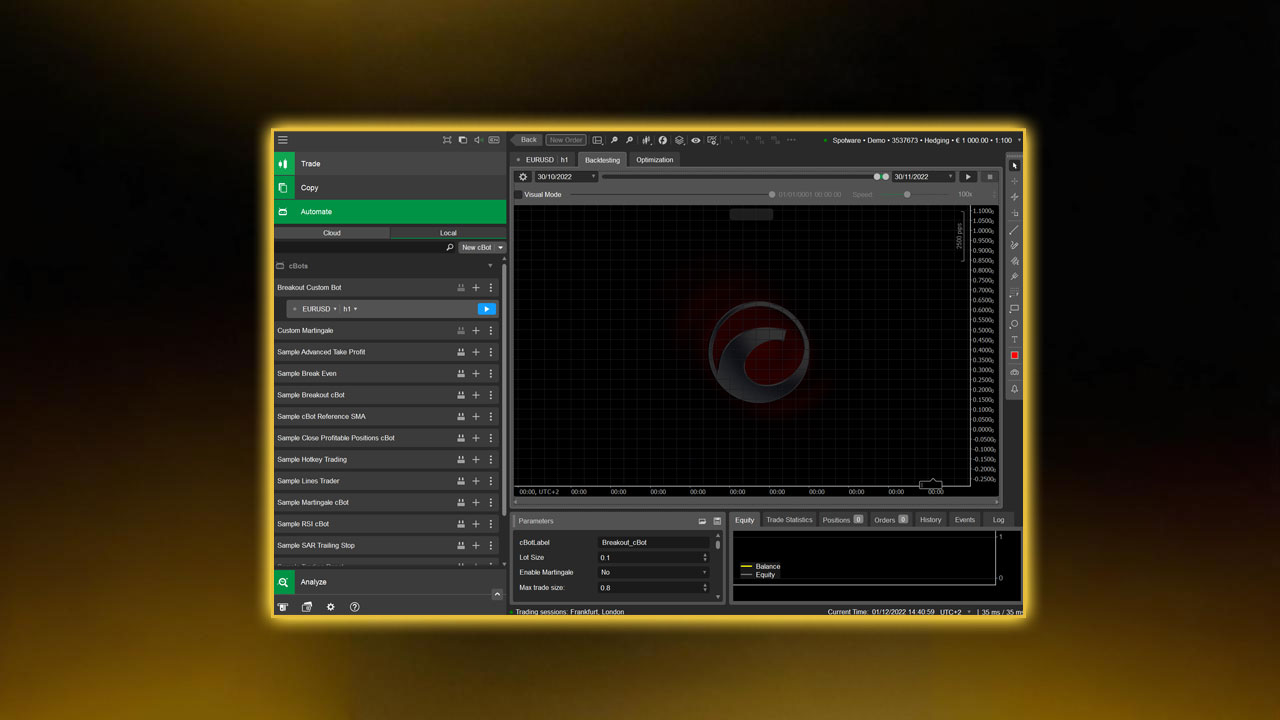
Step 1: Build Your cBot in cTrader Automate
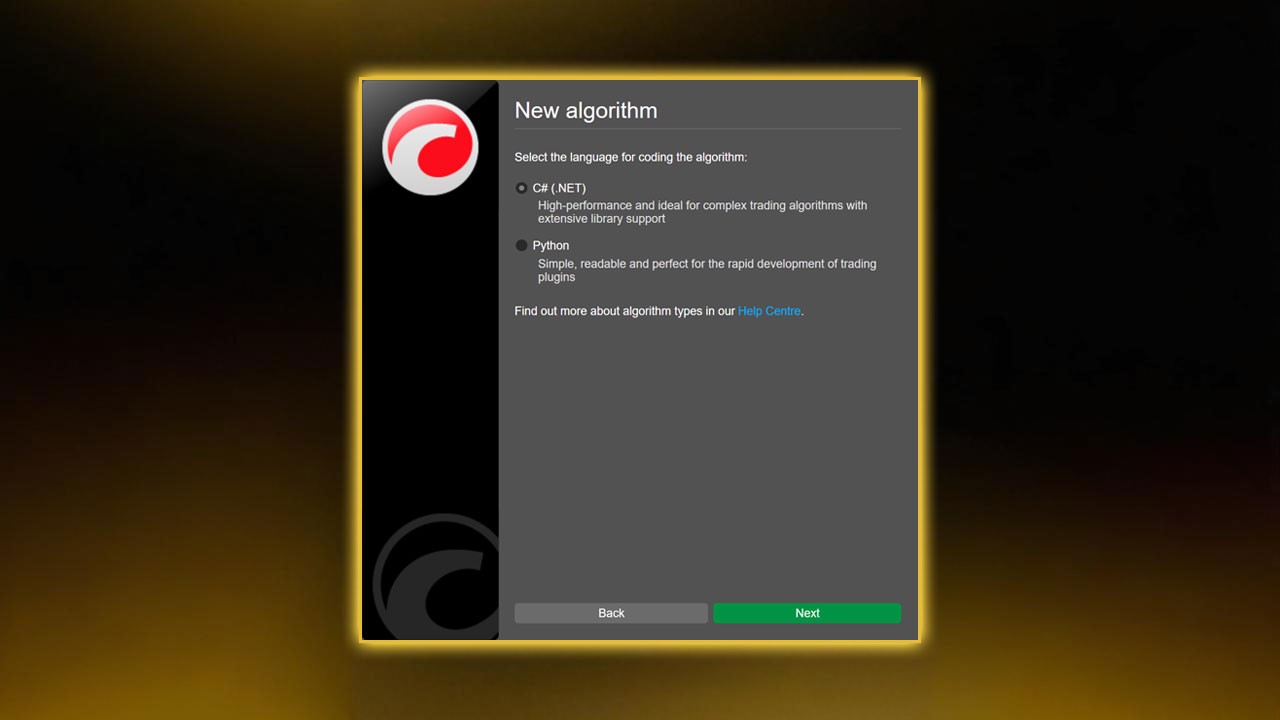
Open cTrader and switch to Automate. Click New cBot and give it a clear name, such as "NY Breakout Prop Bot".
Inside the code window, add rule blocks like:
Entry trigger (for example, break of a range)
Stop loss logic
Take profit logic
Break-even rule
Trailing stop rule
Time filters (which hours to trade)
Max trades per day
Keep the first version simple. Your goal is a clean base for cTrader backtesting, not a complex “final” bot. You can always add filters later once the core idea works.
For traders comparing tools or looking to pick the right software for prop firm challenges, you can read cTrader vs MT5, for a broader breakdown of why cTrader is often preferred.
Step 2: Add Prop Firm Limits to Your cBot
Many traders fail because they test a strategy that only works with wide risk. When they move to a prop firm with strict limits, the same plan breaks.
To keep your cTrader backtesting honest, add rules like:
Daily Loss Limit
Track your profit and loss for each day. Once daily loss hits your limit, block new trades and stop the bot for that day.
Max Drawdown
Check your equity on each trade close. If equity falls below the max drawdown line, close all trades and stop trading. Your cTrader backtesting should show this, so you know if the plan is safe.
Trade Size Cap
Force the cBot to use lot sizes that fit your prop rules. You can use a fixed lot size or a percent of equity, but it must stay inside the firm’s rules.
No Overnight Holding
If your prop firm does not allow trades past a set time, add a time check. Close open trades before that time and block new ones until the next day.
News Filter (Optional)
If you want to avoid high-impact news, create a simple time list and tell your cBot not to open trades near those times. This will show in your cTrader backtesting and help you see the impact of news filters.
These controls make your strategy more stable and ready for real prop challenges.
If you would like to learn how these rules apply in live funded phases, read How to Use cTrader for Prop Firm Challenges and Funded Goals so that you see how the platform performs beyond backtesting.
Step 3: Select Market and Date Range for cTrader Backtesting
Go to the Backtesting tab. Choose your market. Many prop traders use:
EURUSD
GBPUSD
USDJPY
XAUUSD
NAS100 or other indices
Pick the time frame that fits your style:
1–5 minutes for scalping
15 minutes to H1 for intraday
H4 and above for swing trading
For reliable cTrader backtesting, use at least three years of data. Five years is even better. Longer tests expose your idea to more types of markets.
At this stage, you might be looking for prop firms that actually support cTrader, since not all platforms offer it. In this guide you can check Best cTrader Prop Firms which allows you to use the exact setup you are backtesting here.
Step 4: Set Backtest Parameters
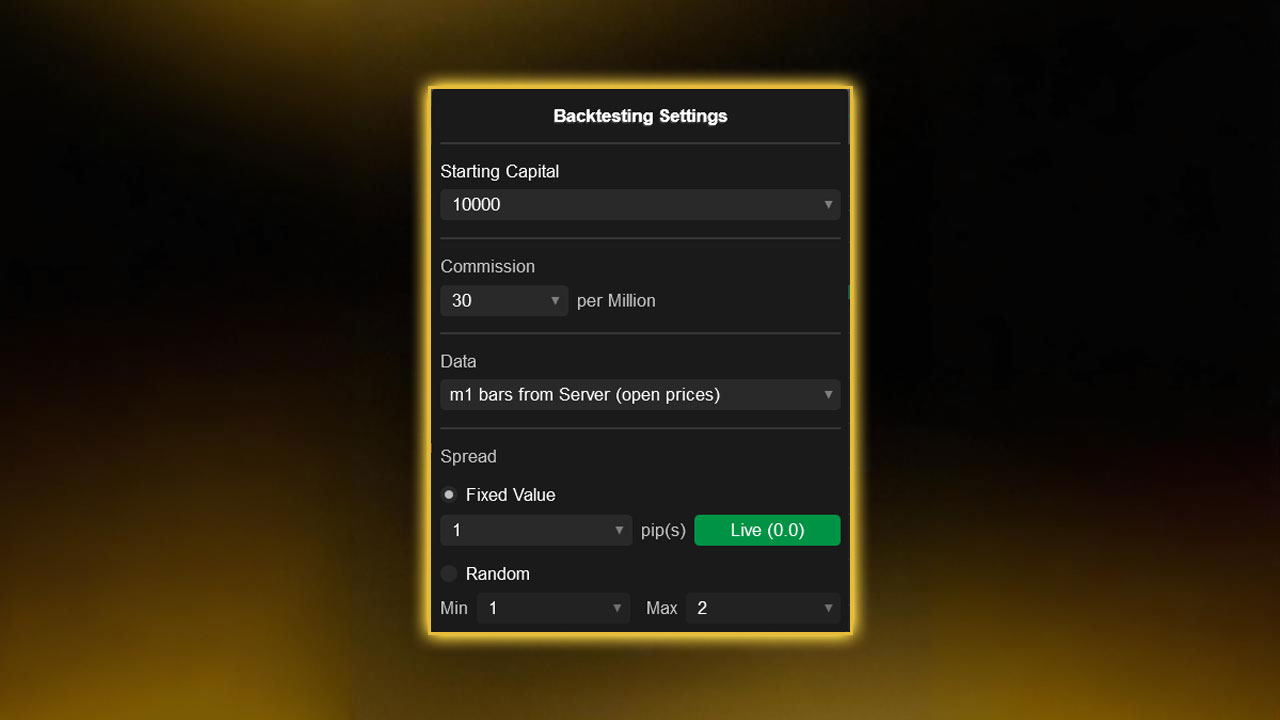
On the left side of the backtest panel, set:
Starting balance (match your prop account size)
Commission model (match your broker or prop firm)
Spread type (fixed or variable)
Slippage size
Data type: tick data or bar data
Tick data is slow but more real. It is better for scalping and tight stops. Bar data is faster and fine for higher time frame cTrader backtesting.
Use realistic spreads, not tiny, ideal ones. If your prop firm or broker offers raw spreads plus a fee, copy this structure. Also add some slippage, such as 1–2 pips on fast pairs or indices, so your cTrader backtesting does not paint a perfect but fake picture.
Step 5: Run the Backtest
Click Start and let the cBot run through the full data range.
When it finishes, you will see:
Equity curve
Balance curve
Trade list
Summary statistics
Key stats to check in your cTrader backtesting report:
Net profit or loss
Max drawdown (absolute and percentage)
Daily loss streaks
Win rate
Average win vs average loss
Number of trades
Profit factor
Expectancy per trade
Good tests show steady growth with controlled dips. Sharp drops, long flat periods, or sudden spikes followed by crashes are warning signs.
Step 6: Study the Equity Curve in cTrader Backtesting
The equity curve tells the true story of your bot. Look for:
A smooth, steady climb
Small, normal pullbacks
No huge single-day crashes
No long, flat periods with no progress
Stable behavior during both calm and wild markets
If your cTrader backtesting curve rises fast but then drops hard, your strategy may be too aggressive for prop firm rules. A slower, steadier curve with low drawdown is usually better for passing challenges.
Zoom in on key periods:
High volatility months
Major news weeks
Holiday periods
See how your bot behaved. If your strategy always loses around news or during thin markets, you may need better filters.
Step 7: Study the Drawdown
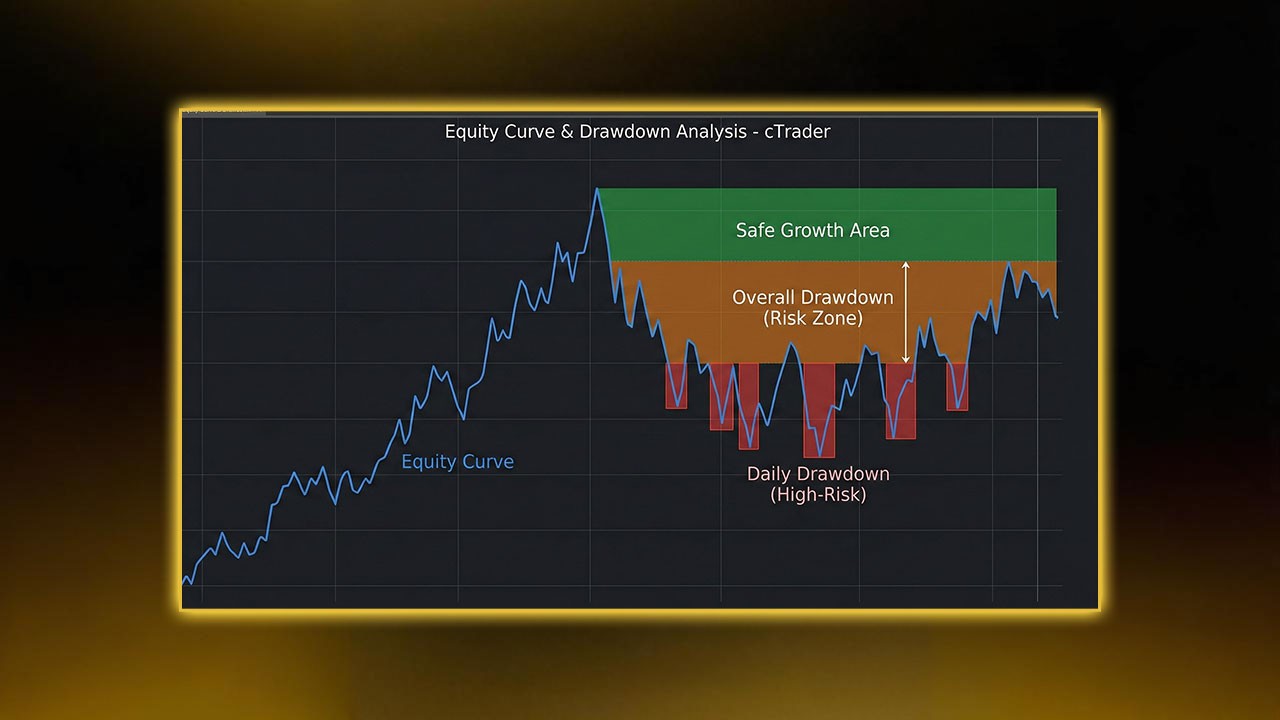
Drawdown tells you the worst loss your account faced during the test. Prop firms focus on this more than they do on total profit.
For example:
If your max drawdown is 8%
And your prop firm allows 10%
You are very close to the edge. One bad week with slippage and spread spikes could push you over the limit.
Aim for max drawdown in the 4–6% range in your cTrader backtesting. This gives you a buffer. Also look at daily drawdown. If your daily loss often hits or comes close to the firm’s daily cap, reduce risk per trade or limit the number of trades per day.
This part of the backtesting process connects directly to real‑world risk control. If you want a deeper look at how to handle drawdown and protect your account the right way, check our article about What Is Risk Management in Forex Prop Trading for a clear breakdown of why strict risk rules matter so much in funded trading.
Step 8: Review Each Trade in the Trade Log
Open the Trade Log and scroll through your entries. Do not just stare at the summary.
Check:
Time of entry and exit
Price relative to recent highs and lows
How often stops were hit by a few pips
How often price went in your favor but you exited too late
Before you study how each trade played out, it helps to understand how exit decisions shape backtest results. Stop‑loss and take‑profit placement often decides whether a strategy grows or stalls. Readers who want a clearer view of how to build stronger exit rules can check Stop Loss and Take Profit for practical guidance on improving trade management.
You can Ask yourself:
Does the bot enter too early, before the move is clear?
Does it trade during low-volume sessions with poor follow-through?
Does it chase price after a big candle?
Does it miss clear entries because rules are too strict?
Your next round of cTrader backtesting should test fixes for the most common problems you find here.
Step 9: Optimize Your cBot (Without Overfitting)
cTrader has a built-in Optimizer tool. It can test many values for each input and find the best combinations based on your target.
At this stage of the process, traders often begin thinking about how to turn a tested idea into something fully automated. We suggest reading our guide about cTrader cBot Strategy, since it shows how a refined and optimized plan can be converted into a complete cBot workflow.
Useful inputs to test in cTrader backtesting:
Stop loss size
Take profit size
Time-of-day filters
ATR or volatility filters
Moving average lengths
Breakout range size
Set wide, realistic ranges. Do not search for perfect settings that only work on your past data. That leads to overfitting.
Focus on:
A stable profit factor (for example, above 1.3)
Smooth equity curve across years
Similar behavior in different periods
Reasonable drawdown
If tiny changes in one input cause huge swings in results, your strategy may be fragile. In that case, simplify the rules and run fresh cTrader backtesting with fewer moving parts.
Step 10: Run a Forward Test on New Data
Forward testing means you split your data into two blocks:
Block 1: you use this to tune and optimize your bot
Block 2: you freeze your settings and test without touching the code
If your cTrader backtesting results are strong in both blocks, your plan is more robust. If block 1 looks great but block 2 looks bad, you have likely overfitted to the first block.
You can repeat this process with different date ranges to see if your strategy holds up in new periods.
Step 11: Test Multiple Markets with cTrader Backtesting
A strong idea should not only work on one pair. It does not have to be perfect on all markets, but it should not blow up when you change symbols.
Run cTrader backtesting on:
A major pair like EURUSD
Another major or cross like GBPUSD or USDJPY
A metal like XAUUSD
An index like NAS100
Look for:
Profit factor above 1.2–1.5 on more than one market
Controlled max drawdown
No huge equity crashes
If your bot only works on one pair and fails on all others, it might be tuned to that one chart instead of built on a true edge.
Step 12: Save and Export Your Results
Organize your work. Save your cTrader backtesting data and bot versions so you can track progress.
Good naming examples:
cBot_v1_Backtest_2019_2024
cBot_v1_Opt_Results_Set1
cBot_v1_ForwardTest_Block2
When you improve the bot, save it as v2, v3, and so on. Never delete or overwrite a version that gave stable, safe results. You may need to go back to it.
Step 13: Run Walk-Forward Tests
Walk-forward testing is an advanced form of cTrader backtesting. You split your data into several segments and rotate through them:
Train on Period A, test on Period B
Train on Period B, test on Period C
Train on Period C, test on Period D
This shows how your bot behaves as market conditions change. If your strategy holds up in each test period, it is more likely to survive live trading.
If the bot only works in the period used to tune it but fails in the next period every time, you still have overfitting.
Step 14: Prepare Your Strategy for a Prop Firm Challenge
Once your cTrader backtesting looks clean and stable, convert it into a written trading plan for your prop firm account.
Write down:
Max risk per trade (percent of account)
Max loss per day
Max allowed drawdown
Pairs you trade
Time windows you trade
News events you avoid
Max number of trades per day
Your cBot rules must follow the same limits.
Do not let the bot trade 24 hours a day if your best cTrader backtesting results came from just a few strong hours. Focus on the windows that gave you the best mix of profit and low drawdown.
Also, do not chase huge monthly gains. For prop firm challenges, safe and steady often beats aggressive and wild.
Step 15: Run a Demo Test Under Live Conditions
Before risking real money in a challenge, run your bot on a demo account with real-time data for two to four weeks.
Use the same settings you used in your cTrader backtesting. Then track:
How the equity curve behaves compared to the backtest
How spreads and slippage affect entries and exits
How the bot behaves during fast moves
Whether you stay under daily and total loss limits in live conditions
If demo results are close to your cTrader backtesting results, your plan is more likely to hold up during a real prop firm phase.
Final Thoughts
Strong cTrader backtesting gives you more than nice stats. It gives you a clear view of how your strategy behaves, where it fails, and how to fix it before you risk real money.
Prop firms like Pipstone Capital reward traders who think like risk managers, not gamblers. A well-tested cBot, built on honest cTrader backtesting, helps you:
Control drawdown
Avoid emotional mistakes
Trade with clear rules
Build a track record you can trust
Follow these steps, refine your idea in stages, and treat each new test as data, not drama. Over time, your strategy and your mindset both improve.
FAQs: cTrader Backtesting
1. What is cTrader backtesting?
cTrader backtesting is the process of running your strategy on past price data inside cTrader using a cBot. It shows how your rules would have performed in real market conditions.
2. Why is cTrader backtesting important for prop firm traders?
Prop firms have strict drawdown and daily loss rules. cTrader backtesting lets you see if your plan can survive these limits before you pay for a challenge or trade a funded account.
3. Does cTrader backtesting guarantee future profits?
No. cTrader backtesting does not predict the future. It helps you see how your logic reacts to trends, spikes, and slow periods. You still need risk control and discipline in live trading.
4. Is tick data needed for accurate cTrader backtesting?
Tick data gives the most realistic view, especially for scalping and tight stops. For higher time frames, bar data can be enough, but tick-based cTrader backtesting is always closer to real fills.
5. How often should I run cTrader backtesting?
Run cTrader backtesting every time you change a rule, add a filter, or switch markets. Any change in the plan should be tested on past data before it goes live.



How to Backtest a Prop Firm Strategy Using cTrader cBot
Backtesting tells you if a trading idea works before you risk real money. Prop firms want traders who follow rules and act with intent. A solid cTrader backtesting process gives you that edge. If you use cTrader, the best tool for this job is a cBot, because it runs your rules the same way every time. You get clean data, fast tests, and clear stats that help you fix weak spots in your plan.
This guide walks you through clear, simple steps. You will set up your test, run it, read the results, and turn them into rules you can trust. You can follow this even if you are new to cBots, prop firms, or cTrader backtesting.
Why cTrader Backtesting Matters for Prop Firm Traders
Prop firms care about two things: risk control and steady results. A good cTrader backtesting routine shows if your plan respects both.
You want to know:
Does my plan stay inside the drawdown limits?
Does it take smart trades, not random ones?
Does it earn more than it loses over time?
Does it stay stable during tough markets?
Does it work on more than one pair?
Backtesting with a cBot helps you get these answers without guesswork. You see real numbers, not vague gut feelings. Strong cTrader backtesting also shows how your plan behaves in trends, ranges, spikes, and slow, flat sessions.
What You Need Before You Start cTrader Backtesting
You need four main things to run clean, honest tests.
1. A Clear Strategy
Write your rules in plain steps before you touch any code:
When do you enter a trade?
Why do you enter at that point?
What is your stop loss?
What is your take profit?
When do you skip trades?
Which sessions do you trade or avoid?
No cTrader backtesting will work if your rules change halfway. Lock them in first. Your code should follow your rules, not the other way round.
2. Good Price Data
Use the longest history you can for cTrader backtesting. Five years or more is ideal. This gives you:
Strong trends
Sideways ranges
Sharp breakouts
Slow, low-volume days
Your strategy must survive all of these, not just the clean, easy moves.
3. Prop Firm Rules
Most prop firms have strict limits. Common ones are:
Daily loss limit
Overall max drawdown
Max lot size or risk per trade
News trading rules
Weekend and overnight rules
Time limit for each phase
Your cTrader backtesting has to include these limits. If you test with loose rules but trade with tight rules, your results will be fake.
4. A cBot Version of Your Plan
Your cBot is the script that runs your idea inside cTrader. You can build it from scratch or start from a template. The key is that the cBot logic matches your written rules line by line.
When your notes say “no trades after New York close”, your cTrader backtesting must show the same rule in code.
Step 1: Build Your cBot in cTrader Automate
Open cTrader and switch to Automate. Click New cBot and give it a clear name, such as "NY Breakout Prop Bot".
Inside the code window, add rule blocks like:
Entry trigger (for example, break of a range)
Stop loss logic
Take profit logic
Break-even rule
Trailing stop rule
Time filters (which hours to trade)
Max trades per day
Keep the first version simple. Your goal is a clean base for cTrader backtesting, not a complex “final” bot. You can always add filters later once the core idea works.
For traders comparing tools or looking to pick the right software for prop firm challenges, you can read cTrader vs MT5, for a broader breakdown of why cTrader is often preferred.
Step 2: Add Prop Firm Limits to Your cBot
Many traders fail because they test a strategy that only works with wide risk. When they move to a prop firm with strict limits, the same plan breaks.
To keep your cTrader backtesting honest, add rules like:
Daily Loss Limit
Track your profit and loss for each day. Once daily loss hits your limit, block new trades and stop the bot for that day.
Max Drawdown
Check your equity on each trade close. If equity falls below the max drawdown line, close all trades and stop trading. Your cTrader backtesting should show this, so you know if the plan is safe.
Trade Size Cap
Force the cBot to use lot sizes that fit your prop rules. You can use a fixed lot size or a percent of equity, but it must stay inside the firm’s rules.
No Overnight Holding
If your prop firm does not allow trades past a set time, add a time check. Close open trades before that time and block new ones until the next day.
News Filter (Optional)
If you want to avoid high-impact news, create a simple time list and tell your cBot not to open trades near those times. This will show in your cTrader backtesting and help you see the impact of news filters.
These controls make your strategy more stable and ready for real prop challenges.
If you would like to learn how these rules apply in live funded phases, read How to Use cTrader for Prop Firm Challenges and Funded Goals so that you see how the platform performs beyond backtesting.
Step 3: Select Market and Date Range for cTrader Backtesting
Go to the Backtesting tab. Choose your market. Many prop traders use:
EURUSD
GBPUSD
USDJPY
XAUUSD
NAS100 or other indices
Pick the time frame that fits your style:
1–5 minutes for scalping
15 minutes to H1 for intraday
H4 and above for swing trading
For reliable cTrader backtesting, use at least three years of data. Five years is even better. Longer tests expose your idea to more types of markets.
At this stage, you might be looking for prop firms that actually support cTrader, since not all platforms offer it. In this guide you can check Best cTrader Prop Firms which allows you to use the exact setup you are backtesting here.
Step 4: Set Backtest Parameters
On the left side of the backtest panel, set:
Starting balance (match your prop account size)
Commission model (match your broker or prop firm)
Spread type (fixed or variable)
Slippage size
Data type: tick data or bar data
Tick data is slow but more real. It is better for scalping and tight stops. Bar data is faster and fine for higher time frame cTrader backtesting.
Use realistic spreads, not tiny, ideal ones. If your prop firm or broker offers raw spreads plus a fee, copy this structure. Also add some slippage, such as 1–2 pips on fast pairs or indices, so your cTrader backtesting does not paint a perfect but fake picture.
Step 5: Run the Backtest
Click Start and let the cBot run through the full data range.
When it finishes, you will see:
Equity curve
Balance curve
Trade list
Summary statistics
Key stats to check in your cTrader backtesting report:
Net profit or loss
Max drawdown (absolute and percentage)
Daily loss streaks
Win rate
Average win vs average loss
Number of trades
Profit factor
Expectancy per trade
Good tests show steady growth with controlled dips. Sharp drops, long flat periods, or sudden spikes followed by crashes are warning signs.
Step 6: Study the Equity Curve in cTrader Backtesting
The equity curve tells the true story of your bot. Look for:
A smooth, steady climb
Small, normal pullbacks
No huge single-day crashes
No long, flat periods with no progress
Stable behavior during both calm and wild markets
If your cTrader backtesting curve rises fast but then drops hard, your strategy may be too aggressive for prop firm rules. A slower, steadier curve with low drawdown is usually better for passing challenges.
Zoom in on key periods:
High volatility months
Major news weeks
Holiday periods
See how your bot behaved. If your strategy always loses around news or during thin markets, you may need better filters.
Step 7: Study the Drawdown
Drawdown tells you the worst loss your account faced during the test. Prop firms focus on this more than they do on total profit.
For example:
If your max drawdown is 8%
And your prop firm allows 10%
You are very close to the edge. One bad week with slippage and spread spikes could push you over the limit.
Aim for max drawdown in the 4–6% range in your cTrader backtesting. This gives you a buffer. Also look at daily drawdown. If your daily loss often hits or comes close to the firm’s daily cap, reduce risk per trade or limit the number of trades per day.
This part of the backtesting process connects directly to real‑world risk control. If you want a deeper look at how to handle drawdown and protect your account the right way, check our article about What Is Risk Management in Forex Prop Trading for a clear breakdown of why strict risk rules matter so much in funded trading.
Step 8: Review Each Trade in the Trade Log
Open the Trade Log and scroll through your entries. Do not just stare at the summary.
Check:
Time of entry and exit
Price relative to recent highs and lows
How often stops were hit by a few pips
How often price went in your favor but you exited too late
Before you study how each trade played out, it helps to understand how exit decisions shape backtest results. Stop‑loss and take‑profit placement often decides whether a strategy grows or stalls. Readers who want a clearer view of how to build stronger exit rules can check Stop Loss and Take Profit for practical guidance on improving trade management.
You can Ask yourself:
Does the bot enter too early, before the move is clear?
Does it trade during low-volume sessions with poor follow-through?
Does it chase price after a big candle?
Does it miss clear entries because rules are too strict?
Your next round of cTrader backtesting should test fixes for the most common problems you find here.
Step 9: Optimize Your cBot (Without Overfitting)
cTrader has a built-in Optimizer tool. It can test many values for each input and find the best combinations based on your target.
At this stage of the process, traders often begin thinking about how to turn a tested idea into something fully automated. We suggest reading our guide about cTrader cBot Strategy, since it shows how a refined and optimized plan can be converted into a complete cBot workflow.
Useful inputs to test in cTrader backtesting:
Stop loss size
Take profit size
Time-of-day filters
ATR or volatility filters
Moving average lengths
Breakout range size
Set wide, realistic ranges. Do not search for perfect settings that only work on your past data. That leads to overfitting.
Focus on:
A stable profit factor (for example, above 1.3)
Smooth equity curve across years
Similar behavior in different periods
Reasonable drawdown
If tiny changes in one input cause huge swings in results, your strategy may be fragile. In that case, simplify the rules and run fresh cTrader backtesting with fewer moving parts.
Step 10: Run a Forward Test on New Data
Forward testing means you split your data into two blocks:
Block 1: you use this to tune and optimize your bot
Block 2: you freeze your settings and test without touching the code
If your cTrader backtesting results are strong in both blocks, your plan is more robust. If block 1 looks great but block 2 looks bad, you have likely overfitted to the first block.
You can repeat this process with different date ranges to see if your strategy holds up in new periods.
Step 11: Test Multiple Markets with cTrader Backtesting
A strong idea should not only work on one pair. It does not have to be perfect on all markets, but it should not blow up when you change symbols.
Run cTrader backtesting on:
A major pair like EURUSD
Another major or cross like GBPUSD or USDJPY
A metal like XAUUSD
An index like NAS100
Look for:
Profit factor above 1.2–1.5 on more than one market
Controlled max drawdown
No huge equity crashes
If your bot only works on one pair and fails on all others, it might be tuned to that one chart instead of built on a true edge.
Step 12: Save and Export Your Results
Organize your work. Save your cTrader backtesting data and bot versions so you can track progress.
Good naming examples:
cBot_v1_Backtest_2019_2024
cBot_v1_Opt_Results_Set1
cBot_v1_ForwardTest_Block2
When you improve the bot, save it as v2, v3, and so on. Never delete or overwrite a version that gave stable, safe results. You may need to go back to it.
Step 13: Run Walk-Forward Tests
Walk-forward testing is an advanced form of cTrader backtesting. You split your data into several segments and rotate through them:
Train on Period A, test on Period B
Train on Period B, test on Period C
Train on Period C, test on Period D
This shows how your bot behaves as market conditions change. If your strategy holds up in each test period, it is more likely to survive live trading.
If the bot only works in the period used to tune it but fails in the next period every time, you still have overfitting.
Step 14: Prepare Your Strategy for a Prop Firm Challenge
Once your cTrader backtesting looks clean and stable, convert it into a written trading plan for your prop firm account.
Write down:
Max risk per trade (percent of account)
Max loss per day
Max allowed drawdown
Pairs you trade
Time windows you trade
News events you avoid
Max number of trades per day
Your cBot rules must follow the same limits.
Do not let the bot trade 24 hours a day if your best cTrader backtesting results came from just a few strong hours. Focus on the windows that gave you the best mix of profit and low drawdown.
Also, do not chase huge monthly gains. For prop firm challenges, safe and steady often beats aggressive and wild.
Step 15: Run a Demo Test Under Live Conditions
Before risking real money in a challenge, run your bot on a demo account with real-time data for two to four weeks.
Use the same settings you used in your cTrader backtesting. Then track:
How the equity curve behaves compared to the backtest
How spreads and slippage affect entries and exits
How the bot behaves during fast moves
Whether you stay under daily and total loss limits in live conditions
If demo results are close to your cTrader backtesting results, your plan is more likely to hold up during a real prop firm phase.
Final Thoughts
Strong cTrader backtesting gives you more than nice stats. It gives you a clear view of how your strategy behaves, where it fails, and how to fix it before you risk real money.
Prop firms like Pipstone Capital reward traders who think like risk managers, not gamblers. A well-tested cBot, built on honest cTrader backtesting, helps you:
Control drawdown
Avoid emotional mistakes
Trade with clear rules
Build a track record you can trust
Follow these steps, refine your idea in stages, and treat each new test as data, not drama. Over time, your strategy and your mindset both improve.
FAQs: cTrader Backtesting
1. What is cTrader backtesting?
cTrader backtesting is the process of running your strategy on past price data inside cTrader using a cBot. It shows how your rules would have performed in real market conditions.
2. Why is cTrader backtesting important for prop firm traders?
Prop firms have strict drawdown and daily loss rules. cTrader backtesting lets you see if your plan can survive these limits before you pay for a challenge or trade a funded account.
3. Does cTrader backtesting guarantee future profits?
No. cTrader backtesting does not predict the future. It helps you see how your logic reacts to trends, spikes, and slow periods. You still need risk control and discipline in live trading.
4. Is tick data needed for accurate cTrader backtesting?
Tick data gives the most realistic view, especially for scalping and tight stops. For higher time frames, bar data can be enough, but tick-based cTrader backtesting is always closer to real fills.
5. How often should I run cTrader backtesting?
Run cTrader backtesting every time you change a rule, add a filter, or switch markets. Any change in the plan should be tested on past data before it goes live.
