


Ultimate cTrader cBot Strategy Automate Your Prop Firm Trading

Prop firm challenges are stressful. Tight rules, limited time, and one bad day can wipe out weeks of work. A good cTrader cBot strategy can help you trade more consistently, stick to the rules, and remove a lot of emotional pressure.
This guide walks you through how to build, test, and run a cTrader cBot strategy that fits prop firm rules instead of fighting them.
What Is a cTrader cBot?
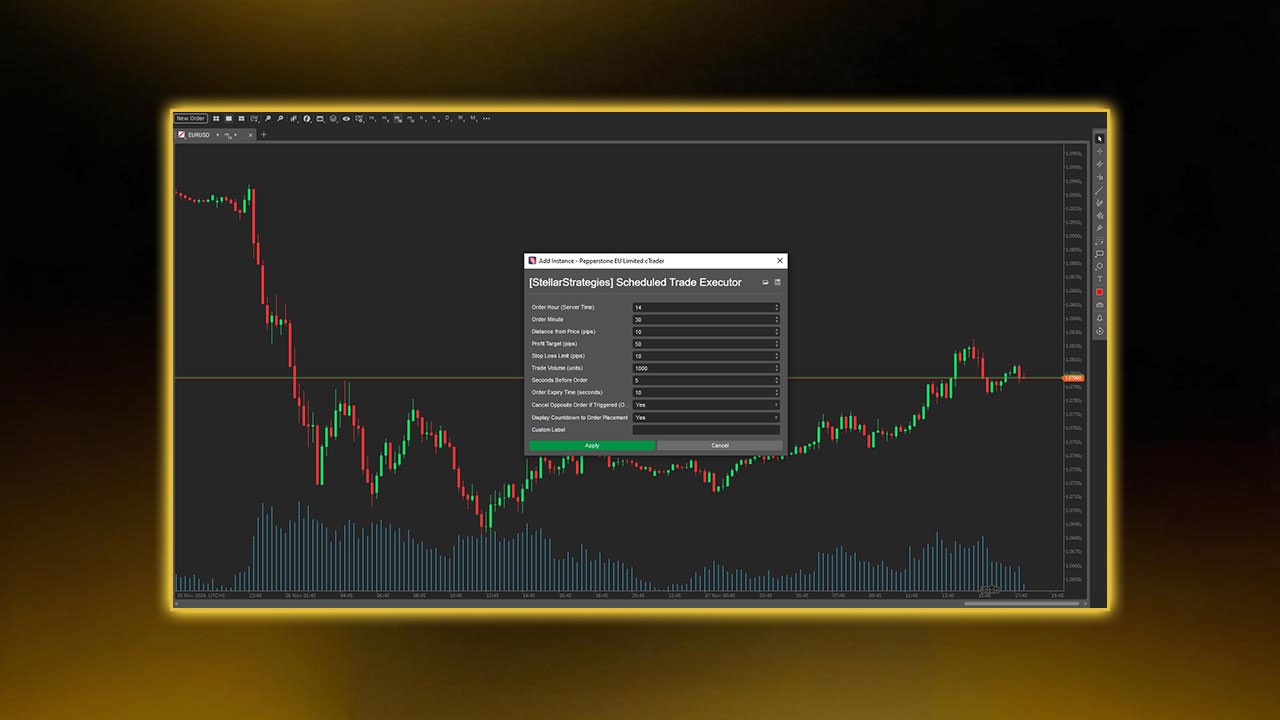
A cBot on cTrader is an automated trading strategy. You set clear rules. The bot opens, manages, and closes trades for you.
A basic cTrader cBot can:
Scan markets for your setup
Open trades when all conditions are met
Set stop loss and take profit instantly
Close trades or pause trading when risk limits are hit
For prop firm traders, that last point is huge. Bots don’t tilt, revenge trade, or break rules because they “feel confident.”
Why Use a cTrader cBot for Prop Firm Challenges?
Prop firm rules are usually strict:
Max daily drawdown (for example, 5%)
Max overall drawdown
No over-leverage
No holding over news or weekends (in some firms)
Minimum or maximum trading days
A well-built cTrader cBot can help you:
Follow risk rules every single time
Avoid emotional mistakes after a loss or a win
Trade your edge consistently, even when you’re tired
Stop trading automatically when daily loss limits are reached
You still need a solid strategy, but automation helps you execute that strategy with fewer human errors. For traders working with forex prop firms like Pipstone Capital, automation ensures that strict rules such as daily drawdown limits and risk controls are followed precisely.
It’s especially useful when trading on large funded accounts or during evaluation phases, where consistency and discipline matter as much as profitability.
Pillars of a Prop-Firm-Safe cTrader cBot Strategy
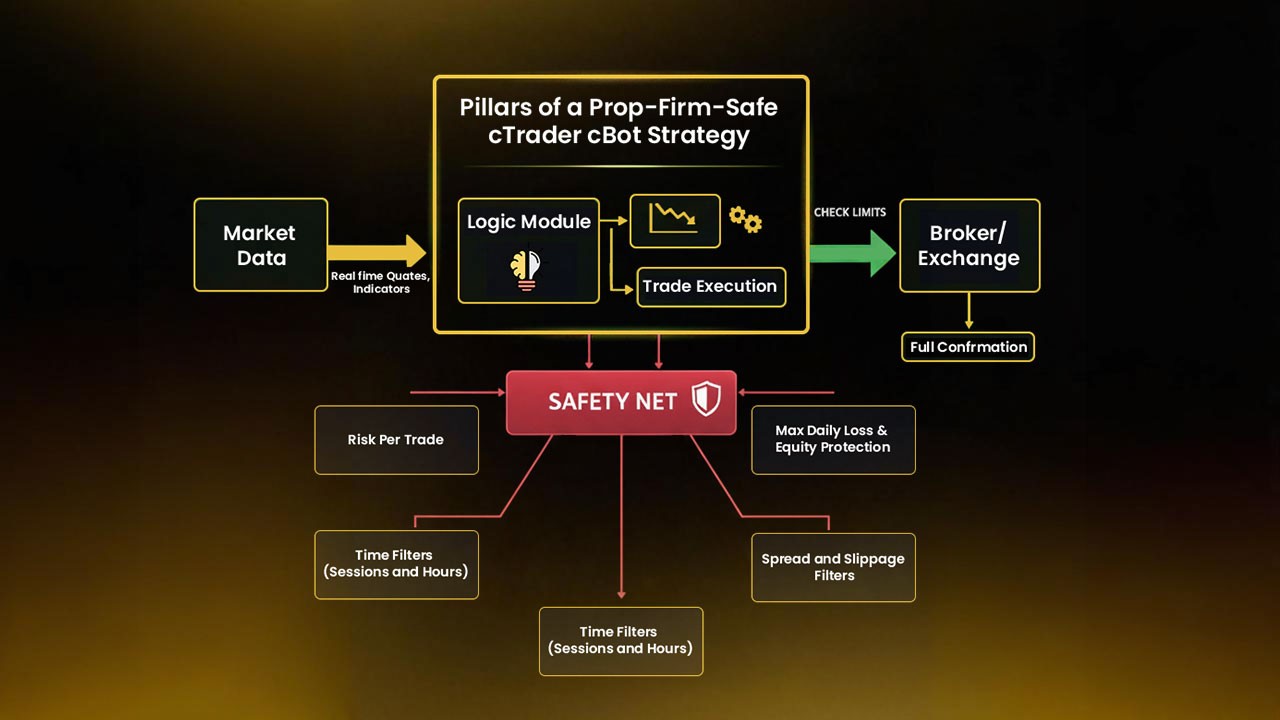
Before thinking about entries and indicators, you need to design the safety net.

1. Risk Per Trade
Decide your risk before you build anything.
For prop firms, a common choice is:
0.25–0.5% per trade on the account balance
If your prop account is $100,000 and you risk 0.5% per trade:
Max loss per trade = $500
Your cBot should:
Take risk as a percentage of balance or equity
Auto-calculate lot size based on stop-loss distance
This keeps every trade sized correctly, even as balance changes. We suggest checking risk management in forex prop trading to better manage your entries.
2. Max Daily Loss and Equity Protection
This part is non-negotiable for prop trading.
Your cBot should:
Track daily realized + floating P/L
Stop opening new trades if daily loss hits your set limit
Optionally close open trades if your daily loss or equity limit is reached
Example daily limit:
Prop firm max daily loss: 5%
Your safety limit: 3–4%
If your account is $50,000:
Prop hard rule: -$2,500 per day
Your cBot limit (say 3%): -$1,500
Once your bot hits -$1,500 for the day, it stops. That buffer gives you room for spread, slippage, and any calculation differences.
3. Time Filters (Sessions and Hours)
Prop traders rarely want their bot running 24/5.
Common filters:
Trade only London and/or New York session
Avoid low-liquidity times (late US session, rollover)
Your cBot should allow you to:
Set start and end trading hours (server time)
Choose days of the week to trade
This keeps your strategy focused on hours when spreads, volatility, and fills are typically better.
4. Spread and Slippage Filters
A prop-friendly strategy cares about execution quality.
Your cBot should:
Only open trades when spread is below a set level
Use slippage limits on orders when possible
Example:
Only trade when spread is under 1.5 pips on EURUSD
Skip trades right after news when spreads spike
This helps avoid random losses caused by poor conditions instead of bad strategy.
5. News Filter (Optional but Very Helpful)
Many prop firms don’t like trading during major news. Even if they allow it, your account can get wrecked in one spike.
Options:
Use a news filter cBot that pauses trading around high-impact events
Manually disable your strategy before big news and re-enable afterward
If your system relies on calm, trending markets, a news filter can save you from nasty surprises. You can read more about in our in-depth blog about how to trade on cTrader.
Building a Simple cTrader cBot Strategy Structure
You don’t need something overly complex or overloaded with indicators. In prop trading, simplicity means reliability. The fewer moving parts your bot depends on, the less room for technical failure or conflicting signals. A clean, rule-based system makes it easier to debug, adjust, and stay compliant with firm rules.
Simple, consistent logic also helps your cBot perform well across different market conditions. You’ll find it easier to maintain consistency in both demo and live environments when the core idea is clear and not dependent on rare or subjective patterns.
Here’s a basic structure you can follow to build a straightforward, dependable framework for your strategy.
Step 1: Pick a Clear Setup
Start by choosing one proven, high-quality setup and master it before combining multiple systems. Avoid mixing ideas that rely on conflicting signals; focus instead on clarity and discipline.
Some solid examples include:
Trend pullback strategy using moving averages + RSI
London breakout strategy
Support/resistance bounce with price action
Momentum continuation strategy during session overlaps
Simple reversal setups on higher timeframes
For instance, if you prefer a trend pullback structure:
Trade only in the direction of the 50 EMA or overall market bias
Wait for RSI to reset from overbought/oversold and confirm momentum returning
Place stop loss just beyond the recent swing high/low
Set take profit between 1.5R and 2R or trail profit as price moves
Keep the rules fully mechanical - no guessing, no “feel.” The clearer your logic, the easier it is to translate into code and test consistently.
Step 2: Translate Your Rules Into cBot Conditions
For a trend pullback strategy, your cBot logic might be:
If price is above 50 EMA, only look for buys
If price dips below a shorter EMA and then closes back above it, mark a potential long setup
If RSI crosses back above a certain level (like 40) after being below it, confirm the buy
Set stop loss under the swing low
Set take profit at 1.5–2x the stop size
Then layer on:
Risk per trade = X%
Only trade between set hours
Only if spread < limit
Stop trading if daily loss hits limit
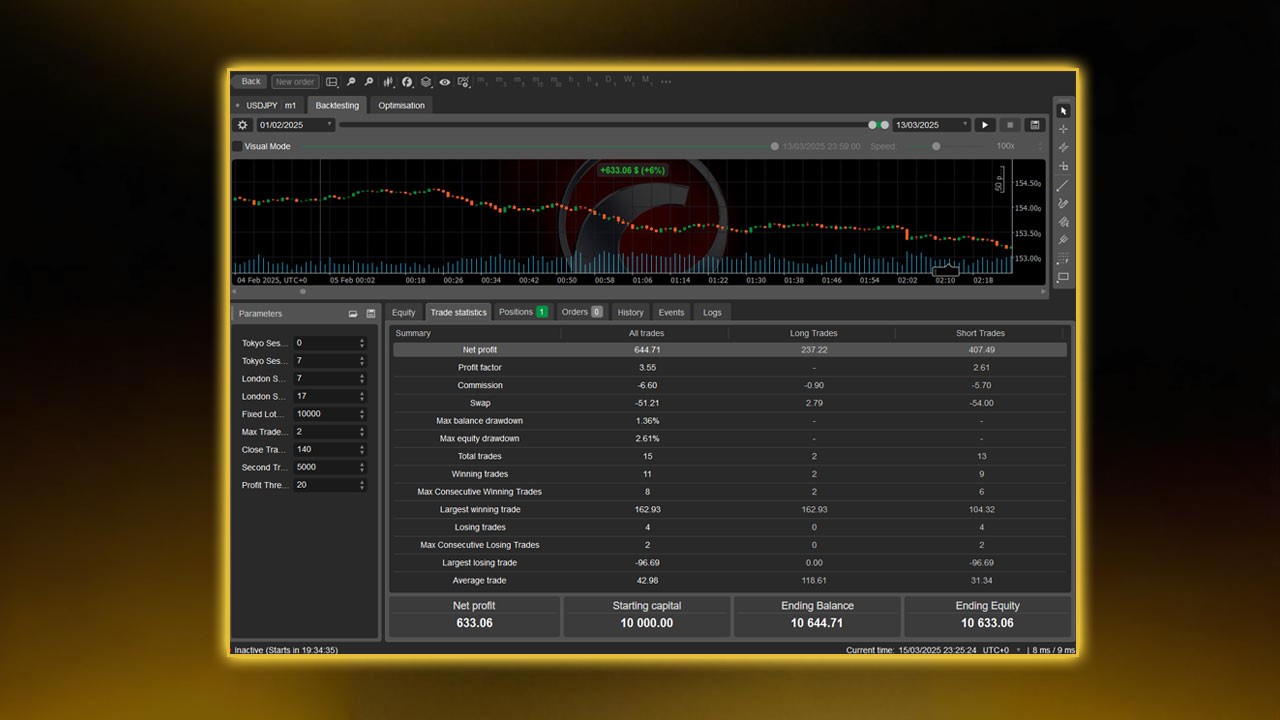
This type of logic can be coded in C# using cTrader Automate. If you’re not a coder, you can:
Start from an existing template cBot and adjust it
Hire a developer to translate your rules into clean code
Use rule-based tools (if available) that generate code from conditions
Step 3: Add Risk and Prop Rules Directly Into the Bot
Your cBot should include:
Daily and overall drawdown protection
Max number of trades per day
Option to pause after a certain number of wins or losses
Example rules:
Max 5 trades per day
Stop trading for the day after 3 consecutive losses
Stop trading for the day after 2R in profit
These help lock in good days and prevent spirals on bad days.
Backtesting Your cTrader cBot for Prop Firms
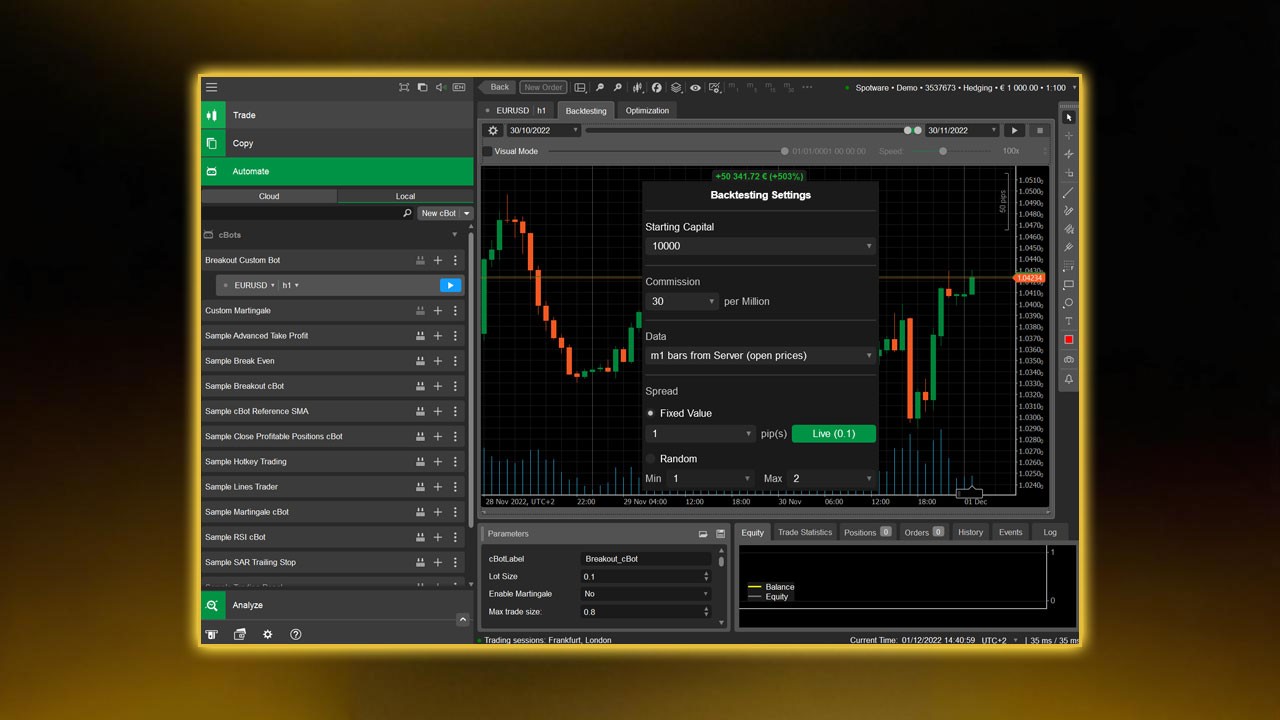
Once you have your logic coded, don’t rush to run it live on a challenge.
Use cTrader’s backtesting tools to check:
Win rate
Average reward-to-risk (R multiple)
Max drawdown
Worst losing streak
Profit factor
For prop trading, pay attention to:
Max drawdown vs firm rules
If your backtest shows a 12% historic drawdown and your prop firm allows 10% total, that’s a red flag.
Equity curve shape
A wild equity curve with sharp drops is risky for challenges.
Consistency over time
Check multiple years, not just one cherry-picked period.
Run tests on different:
Timeframes
Pairs
Market conditions (trending, ranging, volatile periods)
You want to see if the strategy can survive different phases, not only perfect conditions.
Avoiding Over-Optimization
It’s tempting to tweak until every backtest looks perfect. That usually backfires.
Signs you’re over-optimizing:
You have a huge list of input parameters
Small changes destroy performance
The strategy looks great on one period but fails on another
To keep it healthy:
Use few, meaningful inputs (like session times, risk, stop size factor)
Test on one period, then validate on a completely different period
Aim for “good and stable,” not “perfect on paper”
Forward Testing: Demo and Evaluation Accounts
Before going straight to a full challenge:
Run the cBot on a demo account
Use the same broker conditions as your prop firm (or as close as possible).
Let it trade for a few weeks.
Look for differences between backtest and real fills
Slippage
Spread
Execution speed
Then use it on an evaluation account
Start with lower risk if you want extra safety.
Your goal is to see if the bot behaves as expected under live conditions with your prop’s setup.
Best Practices for Running a cTrader cBot on Prop Firm Accounts
A few simple habits can save you a lot of pain:
Read all the prop’s rules twice
Understand margin limits, max open trades, and news restrictions before running the bot. Many traders fail not because of their strategy, but because they broke a simple rule they didn’t notice.
Avoid martingale or unlimited grid systems
These might look profitable at first, but they rely on luck. One bad move can wipe your entire funded account. Stick to fixed-risk systems where every trade has a defined stop loss.
Keep your strategy simple and transparent
You should be able to explain your bot’s logic to another trader in plain words. Simple logic reduces coding bugs and makes backtesting more accurate.
Monitor the bot at least once a day
Check for open positions, order errors, or market changes. Even with automation, you’re still the manager — make sure nothing runs unchecked.
Set alerts and safety stops
Configure notifications if the cBot pauses, hits daily drawdown, or stops unexpectedly. This helps you respond before small issues become big ones.
Remember: your real win isn’t just passing a single phase. It’s building a trading system that keeps your funded account safe and profitable for the long run.
Common Mistakes to Avoid With cTrader cBots on Prop Firms
Risking too much per trade
1–2% works for personal accounts. For prop firms, that’s often too aggressive.
Ignoring daily loss rules
One bad day can end everything. Your bot must protect you from that.
Running the bot during every session
Not every market phase fits your edge. Focus on the times your setup works best.
Not testing enough
One backtest is not enough. You need multiple tests, on different data ranges and conditions.
Turning off the bot manually out of fear
If you constantly interfere, your real results may not match your backtest. Either trust the strategy or don’t use it.
When setting up or optimizing your bot, make sure to review your cTrader app setting to ensure correct risk parameters, trade sessions, and notifications are configured. Proper settings can prevent unwanted trades and improve execution consistency.
Final thoughts

Mastering a cTrader cBot strategy takes time, but the payoff is control and consistency. Automation removes emotion, but discipline and planning still decide your results. Always start small, track performance, and adjust as markets change.
If you’re looking to put your automation skills to the test, Pipstone Capital’s $100,000 funded account challenge is a strong starting point. Pipestone capital gives traders real buying power while enforcing solid risk discipline - a perfect environment for testing a well-built cTrader cBot strategy under true prop firm conditions.
FAQ: cTrader cBot Strategy for Prop Trading
Can I pass a prop firm challenge using only a cBot?
Yes, it’s possible, but not guaranteed. The bot must be built around the firm’s rules, properly tested, and run with realistic risk.
What’s a safe risk per trade for prop challenges?
Many traders use 0.25–0.5% per trade. It allows room for losing streaks without breaking drawdown limits.
Should I run my cBot on many pairs at once?
Not at the start. Begin with one or two pairs you understand well. Add more only after you see stable results.
Do I need to code to use cTrader cBots?
You don’t have to. You can hire a developer or start from template bots and adjust them. But you should at least understand the logic behind your strategy.
How long should I forward test before using it on a challenge?
At minimum, a few weeks on demo. A couple of months of solid forward data is even better, especially if you plan to trade a large funded account.



Ultimate cTrader cBot Strategy Automate Your Prop Firm Trading
Prop firm challenges are stressful. Tight rules, limited time, and one bad day can wipe out weeks of work. A good cTrader cBot strategy can help you trade more consistently, stick to the rules, and remove a lot of emotional pressure.
This guide walks you through how to build, test, and run a cTrader cBot strategy that fits prop firm rules instead of fighting them.
What Is a cTrader cBot?
A cBot on cTrader is an automated trading strategy. You set clear rules. The bot opens, manages, and closes trades for you.
A basic cTrader cBot can:
Scan markets for your setup
Open trades when all conditions are met
Set stop loss and take profit instantly
Close trades or pause trading when risk limits are hit
For prop firm traders, that last point is huge. Bots don’t tilt, revenge trade, or break rules because they “feel confident.”
Why Use a cTrader cBot for Prop Firm Challenges?
Prop firm rules are usually strict:
Max daily drawdown (for example, 5%)
Max overall drawdown
No over-leverage
No holding over news or weekends (in some firms)
Minimum or maximum trading days
A well-built cTrader cBot can help you:
Follow risk rules every single time
Avoid emotional mistakes after a loss or a win
Trade your edge consistently, even when you’re tired
Stop trading automatically when daily loss limits are reached
You still need a solid strategy, but automation helps you execute that strategy with fewer human errors. For traders working with forex prop firms like Pipstone Capital, automation ensures that strict rules such as daily drawdown limits and risk controls are followed precisely.
It’s especially useful when trading on large funded accounts or during evaluation phases, where consistency and discipline matter as much as profitability.
Pillars of a Prop-Firm-Safe cTrader cBot Strategy
Before thinking about entries and indicators, you need to design the safety net.
1. Risk Per Trade
Decide your risk before you build anything.
For prop firms, a common choice is:
0.25–0.5% per trade on the account balance
If your prop account is $100,000 and you risk 0.5% per trade:
Max loss per trade = $500
Your cBot should:
Take risk as a percentage of balance or equity
Auto-calculate lot size based on stop-loss distance
This keeps every trade sized correctly, even as balance changes. We suggest checking risk management in forex prop trading to better manage your entries.
2. Max Daily Loss and Equity Protection
This part is non-negotiable for prop trading.
Your cBot should:
Track daily realized + floating P/L
Stop opening new trades if daily loss hits your set limit
Optionally close open trades if your daily loss or equity limit is reached
Example daily limit:
Prop firm max daily loss: 5%
Your safety limit: 3–4%
If your account is $50,000:
Prop hard rule: -$2,500 per day
Your cBot limit (say 3%): -$1,500
Once your bot hits -$1,500 for the day, it stops. That buffer gives you room for spread, slippage, and any calculation differences.
3. Time Filters (Sessions and Hours)
Prop traders rarely want their bot running 24/5.
Common filters:
Trade only London and/or New York session
Avoid low-liquidity times (late US session, rollover)
Your cBot should allow you to:
Set start and end trading hours (server time)
Choose days of the week to trade
This keeps your strategy focused on hours when spreads, volatility, and fills are typically better.
4. Spread and Slippage Filters
A prop-friendly strategy cares about execution quality.
Your cBot should:
Only open trades when spread is below a set level
Use slippage limits on orders when possible
Example:
Only trade when spread is under 1.5 pips on EURUSD
Skip trades right after news when spreads spike
This helps avoid random losses caused by poor conditions instead of bad strategy.
5. News Filter (Optional but Very Helpful)
Many prop firms don’t like trading during major news. Even if they allow it, your account can get wrecked in one spike.
Options:
Use a news filter cBot that pauses trading around high-impact events
Manually disable your strategy before big news and re-enable afterward
If your system relies on calm, trending markets, a news filter can save you from nasty surprises. You can read more about in our in-depth blog about how to trade on cTrader.
Building a Simple cTrader cBot Strategy Structure
You don’t need something overly complex or overloaded with indicators. In prop trading, simplicity means reliability. The fewer moving parts your bot depends on, the less room for technical failure or conflicting signals. A clean, rule-based system makes it easier to debug, adjust, and stay compliant with firm rules.
Simple, consistent logic also helps your cBot perform well across different market conditions. You’ll find it easier to maintain consistency in both demo and live environments when the core idea is clear and not dependent on rare or subjective patterns.
Here’s a basic structure you can follow to build a straightforward, dependable framework for your strategy.
Step 1: Pick a Clear Setup
Start by choosing one proven, high-quality setup and master it before combining multiple systems. Avoid mixing ideas that rely on conflicting signals; focus instead on clarity and discipline.
Some solid examples include:
Trend pullback strategy using moving averages + RSI
London breakout strategy
Support/resistance bounce with price action
Momentum continuation strategy during session overlaps
Simple reversal setups on higher timeframes
For instance, if you prefer a trend pullback structure:
Trade only in the direction of the 50 EMA or overall market bias
Wait for RSI to reset from overbought/oversold and confirm momentum returning
Place stop loss just beyond the recent swing high/low
Set take profit between 1.5R and 2R or trail profit as price moves
Keep the rules fully mechanical - no guessing, no “feel.” The clearer your logic, the easier it is to translate into code and test consistently.
Step 2: Translate Your Rules Into cBot Conditions
For a trend pullback strategy, your cBot logic might be:
If price is above 50 EMA, only look for buys
If price dips below a shorter EMA and then closes back above it, mark a potential long setup
If RSI crosses back above a certain level (like 40) after being below it, confirm the buy
Set stop loss under the swing low
Set take profit at 1.5–2x the stop size
Then layer on:
Risk per trade = X%
Only trade between set hours
Only if spread < limit
Stop trading if daily loss hits limit
This type of logic can be coded in C# using cTrader Automate. If you’re not a coder, you can:
Start from an existing template cBot and adjust it
Hire a developer to translate your rules into clean code
Use rule-based tools (if available) that generate code from conditions
Step 3: Add Risk and Prop Rules Directly Into the Bot
Your cBot should include:
Daily and overall drawdown protection
Max number of trades per day
Option to pause after a certain number of wins or losses
Example rules:
Max 5 trades per day
Stop trading for the day after 3 consecutive losses
Stop trading for the day after 2R in profit
These help lock in good days and prevent spirals on bad days.
Backtesting Your cTrader cBot for Prop Firms
Once you have your logic coded, don’t rush to run it live on a challenge.
Use cTrader’s backtesting tools to check:
Win rate
Average reward-to-risk (R multiple)
Max drawdown
Worst losing streak
Profit factor
For prop trading, pay attention to:
Max drawdown vs firm rules
If your backtest shows a 12% historic drawdown and your prop firm allows 10% total, that’s a red flag.
Equity curve shape
A wild equity curve with sharp drops is risky for challenges.
Consistency over time
Check multiple years, not just one cherry-picked period.
Run tests on different:
Timeframes
Pairs
Market conditions (trending, ranging, volatile periods)
You want to see if the strategy can survive different phases, not only perfect conditions.
Avoiding Over-Optimization
It’s tempting to tweak until every backtest looks perfect. That usually backfires.
Signs you’re over-optimizing:
You have a huge list of input parameters
Small changes destroy performance
The strategy looks great on one period but fails on another
To keep it healthy:
Use few, meaningful inputs (like session times, risk, stop size factor)
Test on one period, then validate on a completely different period
Aim for “good and stable,” not “perfect on paper”
Forward Testing: Demo and Evaluation Accounts
Before going straight to a full challenge:
Run the cBot on a demo account
Use the same broker conditions as your prop firm (or as close as possible).
Let it trade for a few weeks.
Look for differences between backtest and real fills
Slippage
Spread
Execution speed
Then use it on an evaluation account
Start with lower risk if you want extra safety.
Your goal is to see if the bot behaves as expected under live conditions with your prop’s setup.
Best Practices for Running a cTrader cBot on Prop Firm Accounts
A few simple habits can save you a lot of pain:
Read all the prop’s rules twice
Understand margin limits, max open trades, and news restrictions before running the bot. Many traders fail not because of their strategy, but because they broke a simple rule they didn’t notice.
Avoid martingale or unlimited grid systems
These might look profitable at first, but they rely on luck. One bad move can wipe your entire funded account. Stick to fixed-risk systems where every trade has a defined stop loss.
Keep your strategy simple and transparent
You should be able to explain your bot’s logic to another trader in plain words. Simple logic reduces coding bugs and makes backtesting more accurate.
Monitor the bot at least once a day
Check for open positions, order errors, or market changes. Even with automation, you’re still the manager — make sure nothing runs unchecked.
Set alerts and safety stops
Configure notifications if the cBot pauses, hits daily drawdown, or stops unexpectedly. This helps you respond before small issues become big ones.
Remember: your real win isn’t just passing a single phase. It’s building a trading system that keeps your funded account safe and profitable for the long run.
Common Mistakes to Avoid With cTrader cBots on Prop Firms
Risking too much per trade
1–2% works for personal accounts. For prop firms, that’s often too aggressive.
Ignoring daily loss rules
One bad day can end everything. Your bot must protect you from that.
Running the bot during every session
Not every market phase fits your edge. Focus on the times your setup works best.
Not testing enough
One backtest is not enough. You need multiple tests, on different data ranges and conditions.
Turning off the bot manually out of fear
If you constantly interfere, your real results may not match your backtest. Either trust the strategy or don’t use it.
When setting up or optimizing your bot, make sure to review your cTrader app setting to ensure correct risk parameters, trade sessions, and notifications are configured. Proper settings can prevent unwanted trades and improve execution consistency.
Final thoughts
Mastering a cTrader cBot strategy takes time, but the payoff is control and consistency. Automation removes emotion, but discipline and planning still decide your results. Always start small, track performance, and adjust as markets change.
If you’re looking to put your automation skills to the test, Pipstone Capital’s $100,000 funded account challenge is a strong starting point. Pipestone capital gives traders real buying power while enforcing solid risk discipline - a perfect environment for testing a well-built cTrader cBot strategy under true prop firm conditions.
FAQ: cTrader cBot Strategy for Prop Trading
Can I pass a prop firm challenge using only a cBot?
Yes, it’s possible, but not guaranteed. The bot must be built around the firm’s rules, properly tested, and run with realistic risk.
What’s a safe risk per trade for prop challenges?
Many traders use 0.25–0.5% per trade. It allows room for losing streaks without breaking drawdown limits.
Should I run my cBot on many pairs at once?
Not at the start. Begin with one or two pairs you understand well. Add more only after you see stable results.
Do I need to code to use cTrader cBots?
You don’t have to. You can hire a developer or start from template bots and adjust them. But you should at least understand the logic behind your strategy.
How long should I forward test before using it on a challenge?
At minimum, a few weeks on demo. A couple of months of solid forward data is even better, especially if you plan to trade a large funded account.
