


Top Risk Management Tools in cTrader for Prop Firm Challenges
Passing a prop firm challenge requires more than a good trading strategy, you need discipline, precision, and the right tools. This is where risk management in cTrader becomes a major advantage. The platform gives traders advanced control over position sizing, orders, and account analytics, making it easier to stay within prop firm drawdown limits and pass challenges confidently.
This guide breaks down the most important cTrader risk tools, how they work, and how to apply them specifically for prop firm challenges, especially when trading with a prop firm like Pipstone Capital.
1. Order Protection Tools: Stop Loss, Take Profit & Trailing Stop
One of the strongest features of risk management in cTrader is how easily you can protect every position. Prop firm challenges are usually lost because traders let one or two trades run against them with no SL. With cTrader’s built-in protection tools, this becomes avoidable.
Why it matters in prop firm challenges
Maximum daily loss
Maximum overall drawdown
Sometimes consistency rules
Missing an SL can break these limits instantly. Order protection tools help prevent that.
How to use them effectively
a) Hard Stop Loss on every trade
cTrader allows you to set SL in pips, price, or money. For a $100k challenge, risking 0.5% ($500) per trade is reasonable. With risk management in cTrader, you instantly see the monetary risk as soon as you place the SL.
Make it a rule: never enter a position without SL.
To deepen your understanding of SL/TP execution and why correct placement matters, you can also read our guide on Stop Loss and Take Profit in Trading.
b) Take Profit for objective locking
When you’re close to meeting the profit target of a challenge, TP becomes a risk tool. Set a TP that helps you lock profits and avoid emotional trading.
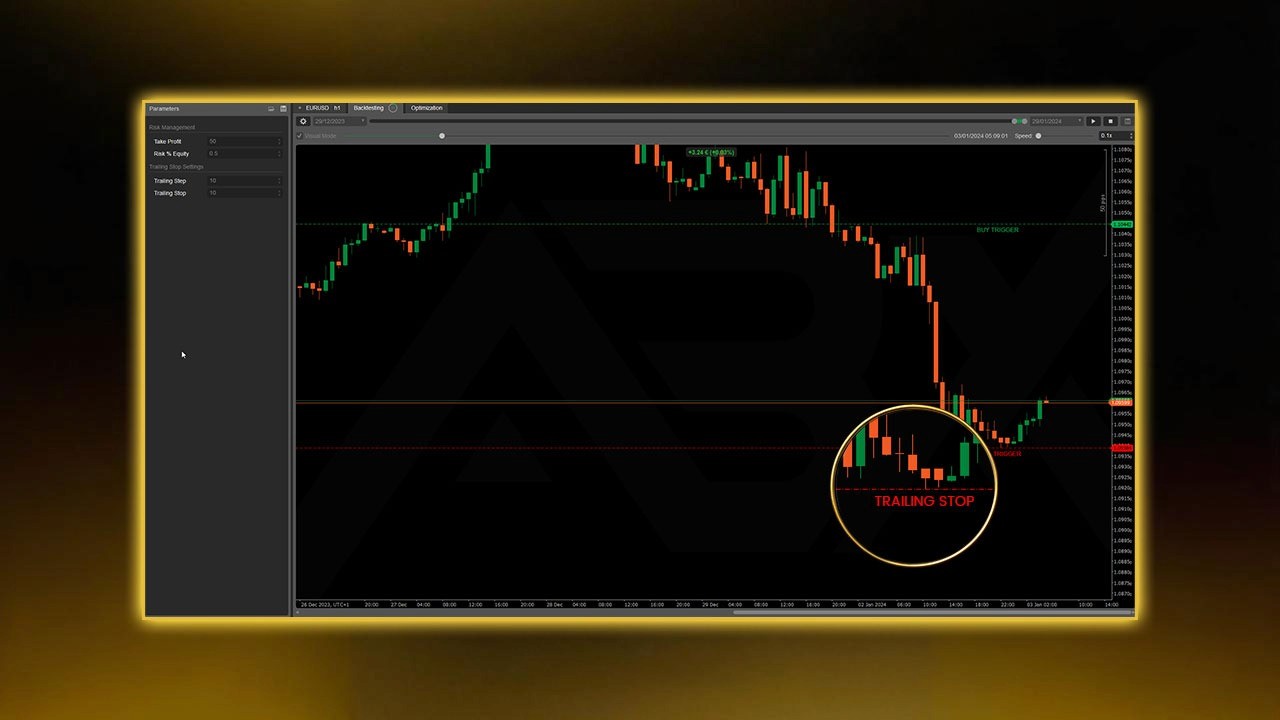
c) Trailing Stop to protect equity
A trailing stop helps you secure gains once a trade moves in your favor. For prop trading, this keeps your equity safely above daily loss limits.

2. Real-Time Money Risk Display in the Order Window
One of the biggest benefits of risk management in cTrader is that the platform shows the exact dollar risk before you place a trade. This protects you from oversizing positions under pressure.
Why it matters
In prop challenges, guessing lot size is dangerous. By viewing your estimated loss directly in the order panel, you instantly know whether your risk is within your rules.
Smart workflow
Set SL based on market structure.
Check the estimated risk.
Adjust lot size until it matches your fixed risk percentage.
This is one of the most precise ways to apply risk management in cTrader.
3. Advanced Order Types That Prevent Impulsive Entries
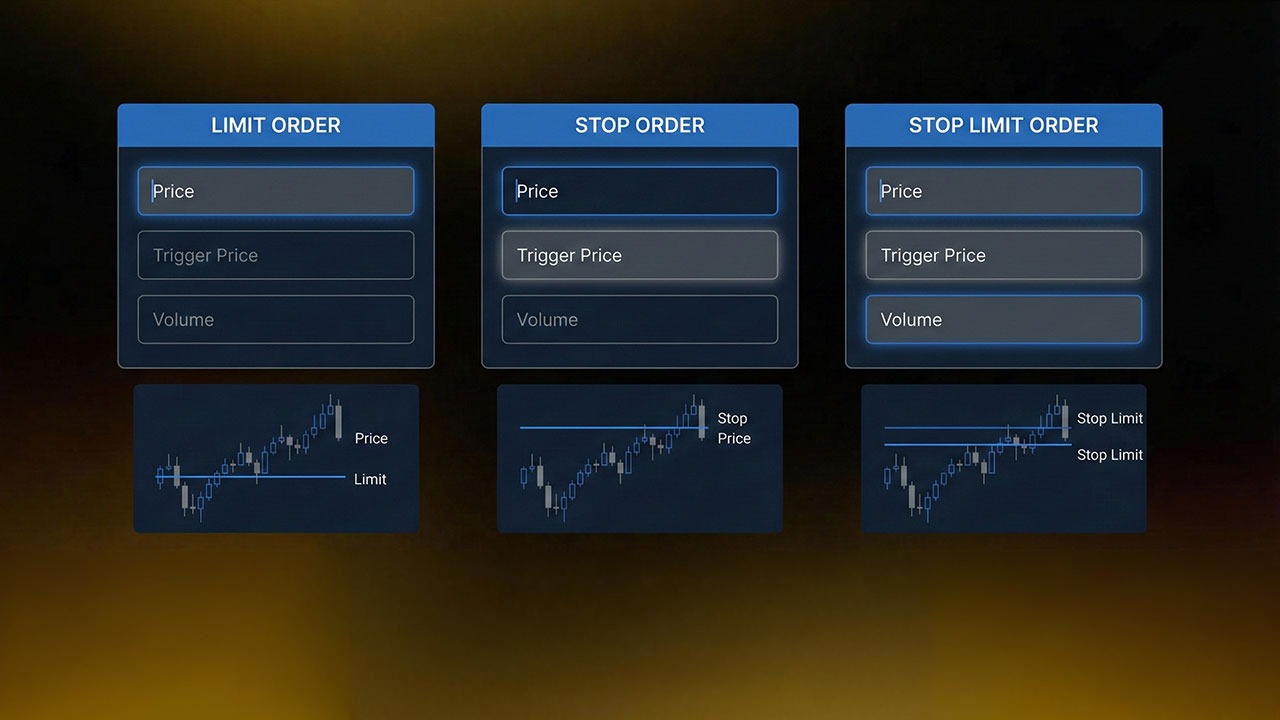
Market entries cause emotional decisions. cTrader’s advanced order types help you stick to your plan instead of reacting impulsively.
Limit Orders
Get better entries, reduce stop size, and improve R:R.
Stop Orders
Enter only when price breaks a level. This avoids low-quality trades.
Stop Limit Orders
Great for volatility control. Reduces slippage risk.
These order types make risk management in cTrader more structured and less emotional.
For traders who want a full walkthrough of platform usage, we also offer a guide about How to Use cTrader for prop trading.
4. Visual SL/TP on the Chart for Clean Execution
Chart trading is another powerful component of risk management in cTrader. You see every detail of your trade before executing it.
You can visually:
Drag SL and TP
See pip distance
View the real R:R
Identify whether stops are placed sensibly
This prevents the common prop challenge mistakes:
Random stops
Overly tight stops
Chasing entries
Ignoring market structure
When trading with Pipstone Capital, visual planning ensures that every trade respects drawdown and daily loss thresholds.
5. Account Monitoring Tools: Equity, Margin, and Exposure
Staying aware of exposure is a major part of risk management in cTrader. Prop firms monitor how disciplined you are with open positions, and cTrader makes this easy.
TradeWatch Panel Displays
Balance
Equity
Margin
Free margin
Margin level %
Open P/L
For prop traders, the focus should ALWAYS be on equity, not just balance.
How this protects you
Prevents overleveraging
Alerts you when open risk is too high
Keeps your trades inside prop firm daily drawdown limits
Example Trade:
If your max daily loss is $5,000, and your open trades risk $4,000, it’s time to reduce exposure. Risk management in cTrader helps you spot this fast.
For additional information on how platform choice affects execution quality and prop‑firm performance, you can read the article about Best cTrader Prop Firms, which highlights why lower spreads and tighter execution matter in risk‑sensitive environments.
6. Alerts & Notifications to Improve Discipline
Good trading discipline is usually hard, especially when you're trading multiple sessions. Alerts make risk management in cTrader automatic instead of emotional.
Useful alert setups
Price reaches key supply/demand zones
Equity drops to a threshold
Your balance hits a profit milestone
Session reminders (London, NY opens)
These alerts prevent overtrading and keep you aligned with prop rules.
If you trade partially on mobile, you can also explore our guide about How to Use cTrader Android App for Forex Funded Accounts for risk‑safe mobile execution.
7. cBots for Automated Risk Control
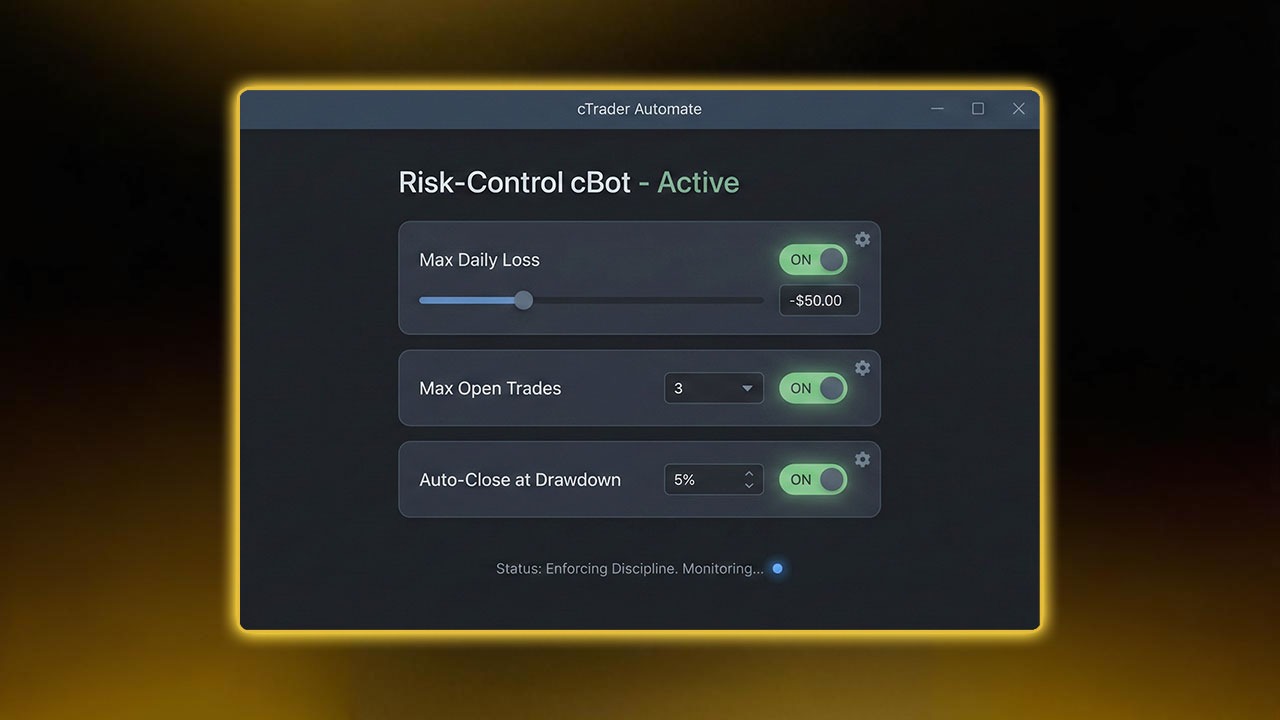
This is one of the strongest areas of risk management in cTrader. If you struggle with discipline, you can automate your own risk rules using cBots.
Examples of practical risk cBots
Enforce max daily loss by auto-locking trading
Prevent new trades when equity drops below a level
Automatically close all trades after a fixed loss
Limit total open risk to a defined percentage
Even manual traders benefit from a “guardian bot” that protects their account from emotional mistakes.
For Pipstone Capital traders, this adds a layer of safety and consistency across evaluations and funded phases.
If you want to learn how automation ties into actual funded‑trading workflow, read our blog about How to use cTrader cBot Strategy for Prop Trading.
8. Multi-Timeframe Layouts for Better Decision Making
A major part of risk management in cTrader is context. Multi-timeframe layouts help you avoid taking trades that go straight into a higher-timeframe zone.
With multi-chart setups, you can track:
Trend direction
Key supply and demand
Weekly highs/lows
Market sessions
This reduces false entries and prevents drawdown caused by trading against the dominant move.
9. Trade History Exporting & Journaling Tools
To stay funded after passing a challenge, you must understand your behavior. Journaling is essential, and risk management in cTrader gives you clean access to all your history.
You can export:
Win/loss distribution
Average R per trade
Risk per trade
Max daily loss you actually hit
Best and worst sessions
Best and worst pairs
Reviewing these weekly helps you refine your prop trading approach.
For a structured way to test your system before trading live or in a challenge, you can read our guide about Backtest with cTrader.
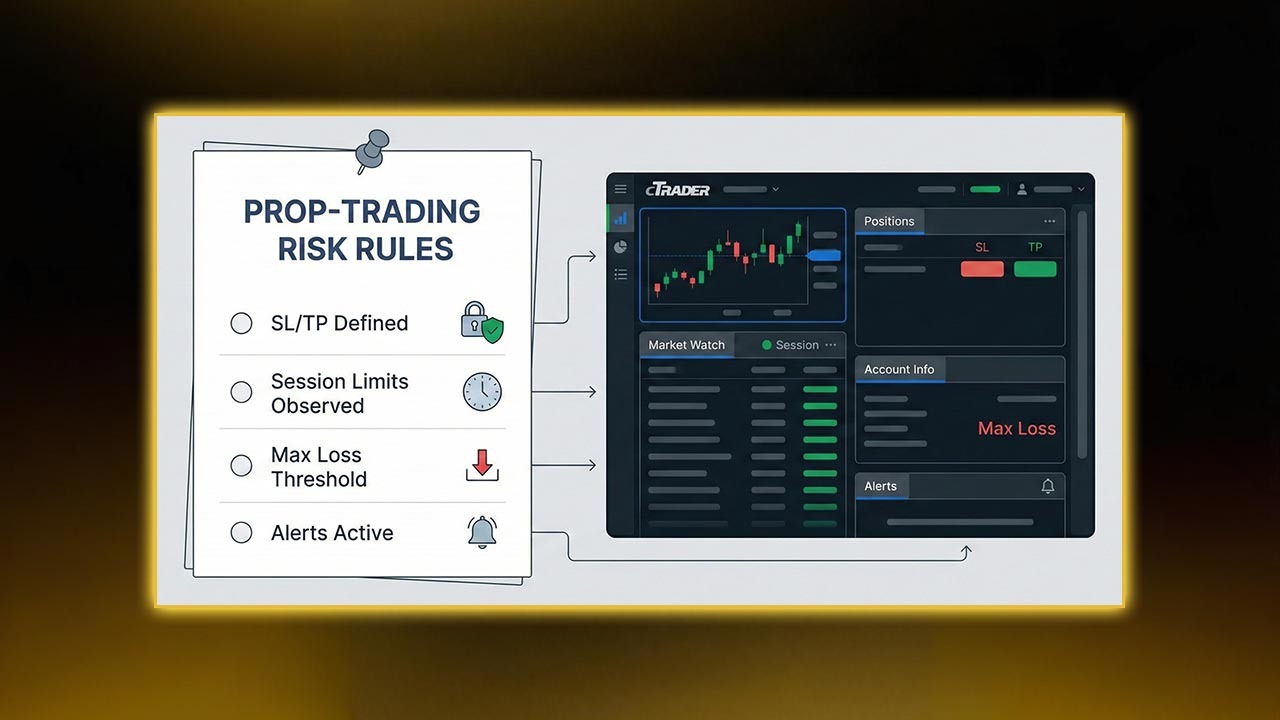
10. The Ultimate Prop Rule Set (Built With cTrader Tools)
Below is a simple but extremely effective rule set that uses the strengths of risk management in cTrader and aligns perfectly with prop firm challenges.
Personal Prop Challenge Risk Rules
Risk per trade: 0.25–0.5%
Max open risk: 1–2%
Max daily loss: 2–3%
Stop after daily target hit
Trade only with SL/TP
Never trade outside your session plan
No revenge trades
Use alerts for major zones
Log every trade daily
With cTrader’s tools, these rules become easy to execute consistently.
Mastering cTrader Risk Tools to Pass Prop Firm Challenges
Prop firm challenges test your discipline more than your strategy. Thanks to the advanced tools for risk management in cTrader, traders can control exposure, plan clean trades, and avoid breaching drawdown rules.
When used correctly, cTrader becomes an advantage - helping you pass challenges, grow accounts, and stay consistently funded with firms like Pipstone Capital, which is known for its trader‑friendly environment such as up to 100% profit split options, no time limits on challenges, and funding packages reaching up to $400,000.
FAQ: Risk Management in cTrader for Prop Firm Challenges
1. Why is risk management in cTrader so effective for prop traders?
Because cTrader shows precise risk numbers, supports visual SL/TP, offers multiple order types, and gives real-time exposure data, making it easier to respect prop limits.
2. Does cTrader help avoid daily drawdown violations?
Yes. With equity monitoring, alerts, and trailing protection, risk management in cTrader helps you track your loss limits throughout the day.
3. Can I automate risk rules in cTrader?
Absolutely. cBots can enforce max risk, close all trades, and even prevent new entries when limits are reached.
4. Does cTrader help with position sizing?
Yes. The order window shows exact money risk, making position sizing extremely accurate.
5. Is cTrader good for Pipstone Capital challenge traders?
Yes. It provides clean execution, transparent risk tools, and helps keep you within Pipstone Capital’s drawdown rules.



Top Risk Management Tools in cTrader for Prop Firm Challenges
Passing a prop firm challenge requires more than a good trading strategy, you need discipline, precision, and the right tools. This is where risk management in cTrader becomes a major advantage. The platform gives traders advanced control over position sizing, orders, and account analytics, making it easier to stay within prop firm drawdown limits and pass challenges confidently.
This guide breaks down the most important cTrader risk tools, how they work, and how to apply them specifically for prop firm challenges, especially when trading with a prop firm like Pipstone Capital.
1. Order Protection Tools: Stop Loss, Take Profit & Trailing Stop
One of the strongest features of risk management in cTrader is how easily you can protect every position. Prop firm challenges are usually lost because traders let one or two trades run against them with no SL. With cTrader’s built-in protection tools, this becomes avoidable.
Why it matters in prop firm challenges
Maximum daily loss
Maximum overall drawdown
Sometimes consistency rules
Missing an SL can break these limits instantly. Order protection tools help prevent that.
How to use them effectively
a) Hard Stop Loss on every trade
cTrader allows you to set SL in pips, price, or money. For a $100k challenge, risking 0.5% ($500) per trade is reasonable. With risk management in cTrader, you instantly see the monetary risk as soon as you place the SL.
Make it a rule: never enter a position without SL.
To deepen your understanding of SL/TP execution and why correct placement matters, you can also read our guide on Stop Loss and Take Profit in Trading.
b) Take Profit for objective locking
When you’re close to meeting the profit target of a challenge, TP becomes a risk tool. Set a TP that helps you lock profits and avoid emotional trading.
c) Trailing Stop to protect equity
A trailing stop helps you secure gains once a trade moves in your favor. For prop trading, this keeps your equity safely above daily loss limits.
2. Real-Time Money Risk Display in the Order Window
One of the biggest benefits of risk management in cTrader is that the platform shows the exact dollar risk before you place a trade. This protects you from oversizing positions under pressure.
Why it matters
In prop challenges, guessing lot size is dangerous. By viewing your estimated loss directly in the order panel, you instantly know whether your risk is within your rules.
Smart workflow
Set SL based on market structure.
Check the estimated risk.
Adjust lot size until it matches your fixed risk percentage.
This is one of the most precise ways to apply risk management in cTrader.
3. Advanced Order Types That Prevent Impulsive Entries
Market entries cause emotional decisions. cTrader’s advanced order types help you stick to your plan instead of reacting impulsively.
Limit Orders
Get better entries, reduce stop size, and improve R:R.
Stop Orders
Enter only when price breaks a level. This avoids low-quality trades.
Stop Limit Orders
Great for volatility control. Reduces slippage risk.
These order types make risk management in cTrader more structured and less emotional.
For traders who want a full walkthrough of platform usage, we also offer a guide about How to Use cTrader for prop trading.
4. Visual SL/TP on the Chart for Clean Execution
Chart trading is another powerful component of risk management in cTrader. You see every detail of your trade before executing it.
You can visually:
Drag SL and TP
See pip distance
View the real R:R
Identify whether stops are placed sensibly
This prevents the common prop challenge mistakes:
Random stops
Overly tight stops
Chasing entries
Ignoring market structure
When trading with Pipstone Capital, visual planning ensures that every trade respects drawdown and daily loss thresholds.
5. Account Monitoring Tools: Equity, Margin, and Exposure
Staying aware of exposure is a major part of risk management in cTrader. Prop firms monitor how disciplined you are with open positions, and cTrader makes this easy.
TradeWatch Panel Displays
Balance
Equity
Margin
Free margin
Margin level %
Open P/L
For prop traders, the focus should ALWAYS be on equity, not just balance.
How this protects you
Prevents overleveraging
Alerts you when open risk is too high
Keeps your trades inside prop firm daily drawdown limits
Example Trade:
If your max daily loss is $5,000, and your open trades risk $4,000, it’s time to reduce exposure. Risk management in cTrader helps you spot this fast.
For additional information on how platform choice affects execution quality and prop‑firm performance, you can read the article about Best cTrader Prop Firms, which highlights why lower spreads and tighter execution matter in risk‑sensitive environments.
6. Alerts & Notifications to Improve Discipline
Good trading discipline is usually hard, especially when you're trading multiple sessions. Alerts make risk management in cTrader automatic instead of emotional.
Useful alert setups
Price reaches key supply/demand zones
Equity drops to a threshold
Your balance hits a profit milestone
Session reminders (London, NY opens)
These alerts prevent overtrading and keep you aligned with prop rules.
If you trade partially on mobile, you can also explore our guide about How to Use cTrader Android App for Forex Funded Accounts for risk‑safe mobile execution.
7. cBots for Automated Risk Control
This is one of the strongest areas of risk management in cTrader. If you struggle with discipline, you can automate your own risk rules using cBots.
Examples of practical risk cBots
Enforce max daily loss by auto-locking trading
Prevent new trades when equity drops below a level
Automatically close all trades after a fixed loss
Limit total open risk to a defined percentage
Even manual traders benefit from a “guardian bot” that protects their account from emotional mistakes.
For Pipstone Capital traders, this adds a layer of safety and consistency across evaluations and funded phases.
If you want to learn how automation ties into actual funded‑trading workflow, read our blog about How to use cTrader cBot Strategy for Prop Trading.
8. Multi-Timeframe Layouts for Better Decision Making
A major part of risk management in cTrader is context. Multi-timeframe layouts help you avoid taking trades that go straight into a higher-timeframe zone.
With multi-chart setups, you can track:
Trend direction
Key supply and demand
Weekly highs/lows
Market sessions
This reduces false entries and prevents drawdown caused by trading against the dominant move.
9. Trade History Exporting & Journaling Tools
To stay funded after passing a challenge, you must understand your behavior. Journaling is essential, and risk management in cTrader gives you clean access to all your history.
You can export:
Win/loss distribution
Average R per trade
Risk per trade
Max daily loss you actually hit
Best and worst sessions
Best and worst pairs
Reviewing these weekly helps you refine your prop trading approach.
For a structured way to test your system before trading live or in a challenge, you can read our guide about Backtest with cTrader.
10. The Ultimate Prop Rule Set (Built With cTrader Tools)
Below is a simple but extremely effective rule set that uses the strengths of risk management in cTrader and aligns perfectly with prop firm challenges.
Personal Prop Challenge Risk Rules
Risk per trade: 0.25–0.5%
Max open risk: 1–2%
Max daily loss: 2–3%
Stop after daily target hit
Trade only with SL/TP
Never trade outside your session plan
No revenge trades
Use alerts for major zones
Log every trade daily
With cTrader’s tools, these rules become easy to execute consistently.
Mastering cTrader Risk Tools to Pass Prop Firm Challenges
Prop firm challenges test your discipline more than your strategy. Thanks to the advanced tools for risk management in cTrader, traders can control exposure, plan clean trades, and avoid breaching drawdown rules.
When used correctly, cTrader becomes an advantage - helping you pass challenges, grow accounts, and stay consistently funded with firms like Pipstone Capital, which is known for its trader‑friendly environment such as up to 100% profit split options, no time limits on challenges, and funding packages reaching up to $400,000.
FAQ: Risk Management in cTrader for Prop Firm Challenges
1. Why is risk management in cTrader so effective for prop traders?
Because cTrader shows precise risk numbers, supports visual SL/TP, offers multiple order types, and gives real-time exposure data, making it easier to respect prop limits.
2. Does cTrader help avoid daily drawdown violations?
Yes. With equity monitoring, alerts, and trailing protection, risk management in cTrader helps you track your loss limits throughout the day.
3. Can I automate risk rules in cTrader?
Absolutely. cBots can enforce max risk, close all trades, and even prevent new entries when limits are reached.
4. Does cTrader help with position sizing?
Yes. The order window shows exact money risk, making position sizing extremely accurate.
5. Is cTrader good for Pipstone Capital challenge traders?
Yes. It provides clean execution, transparent risk tools, and helps keep you within Pipstone Capital’s drawdown rules.
